EasyManua.ls Logo

Emerson CKS9051 - Clock Reset and System Care; Resetting the Clock After Memory Loss; General Maintenance and Precautions

Emerson CKS9051
16 pages
Print Icon
To Next Page IconTo Next Page
To Previous Page IconTo Previous Page
Loading...
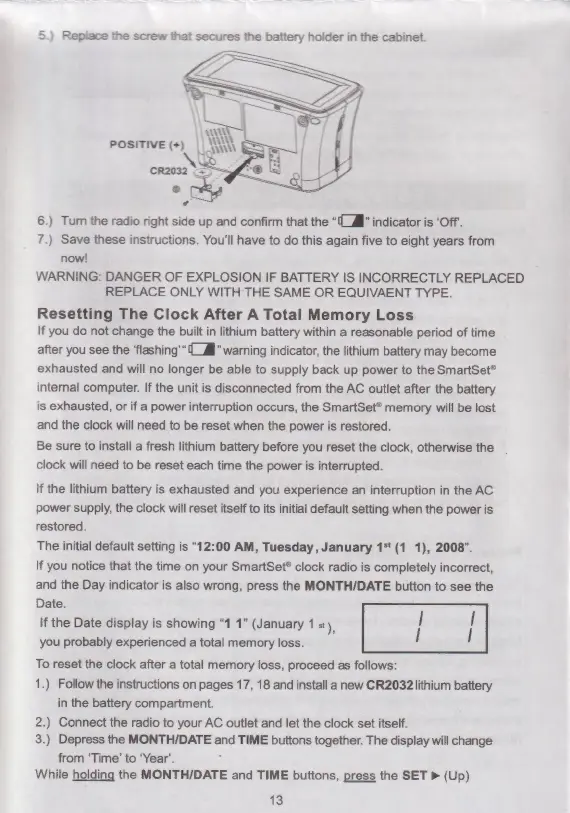
5.)
Replace
the
screw
that
secures
the
battery
holder
in
the
cabinet.
6.)
Turn
the
radio
right
side
up
and
confirm
that
the
“l
Æ”
indicator
is
‘Off.
7.)
Save
these
instructions.
You'll
have
to
do
this
again
five
to
eight
years
from
now!
WARNING:
DANGER
OF
EXPLOSION
IF
BATTERY
IS
INCORRECTLY
REPLACED
REPLACE
ONLY
WITH
THE
SAME
OR
EQUIVAENT
TYPE.
Resetting
The
Clock
After
A
Total
Memory
Loss
If
you
do
not
change
the
built
in
lithium
battery
within
a
reasonable
period
of
time
after
you
see
the
‘flashing’
Æ”
warning
indicator,
the
lithium
battery
may
become
exhausted
and
will
no
longer
be
able
to
supply
back
up
power
to
the
SmartSet®
internal
computer.
If
the
unit
is
disconnected
from
the
AC
outlet
after
the
battery
is
exhausted,
or
if
a
power
interruption
occurs,
the
SmartSet®
memory
will
be
lost
and
the
clock
will
need
to
be
reset
when
the
power
is
restored.
Be
sure
to
install
a
fresh
lithium
battery
before
you
reset
the
clock,
otherwise
the
clock
will
need
to
be
reset
each
time
the
power
is
interrupted.
If
the
lithium
battery
is
exhausted
and
you
experience
an
interruption
in
the
AC
power
supply,
the
clock
will
reset
itself
to
its
initial
default
setting
when
the
power
is
restored.
The
initial
default
setting
is
“12:00
AM,
Tuesday,
January
1*
(1
1),
2008”.
If
you
notice
that
the
time
on
your
SmartSet®
clock
radio
is
completely
incorrect,
and
the
Day
indicator
is
also
wrong,
press
the
MONTH/DATE
button
to
see
the
Date.
If
the
Date
display
is
showing
“1
1”
(January
1
st),
you
probably
experienced
a
total
memory
loss.
To
reset
the
clock
after
a
total
memory
loss,
proceed
as
follows:
1.)
Follow
the
instructions
on
pages
17,
18
and
install
a
new
CR2032lithium
battery
in
the
battery
compartment.
2.)
Connect
the
radio
to
your
AC
outlet
and
let
the
clock
set
itself.
3.)
Depress
the
MONTHIDATE
and
TIME
buttons
together.
The
display
will
change
from
‘Time’
to
‘Year’.
While
holding
the
MONTH/DATE
and
TIME
buttons,
press
the
SET
»
(Up)
13

Related product manuals