PARTS AND FEATURES
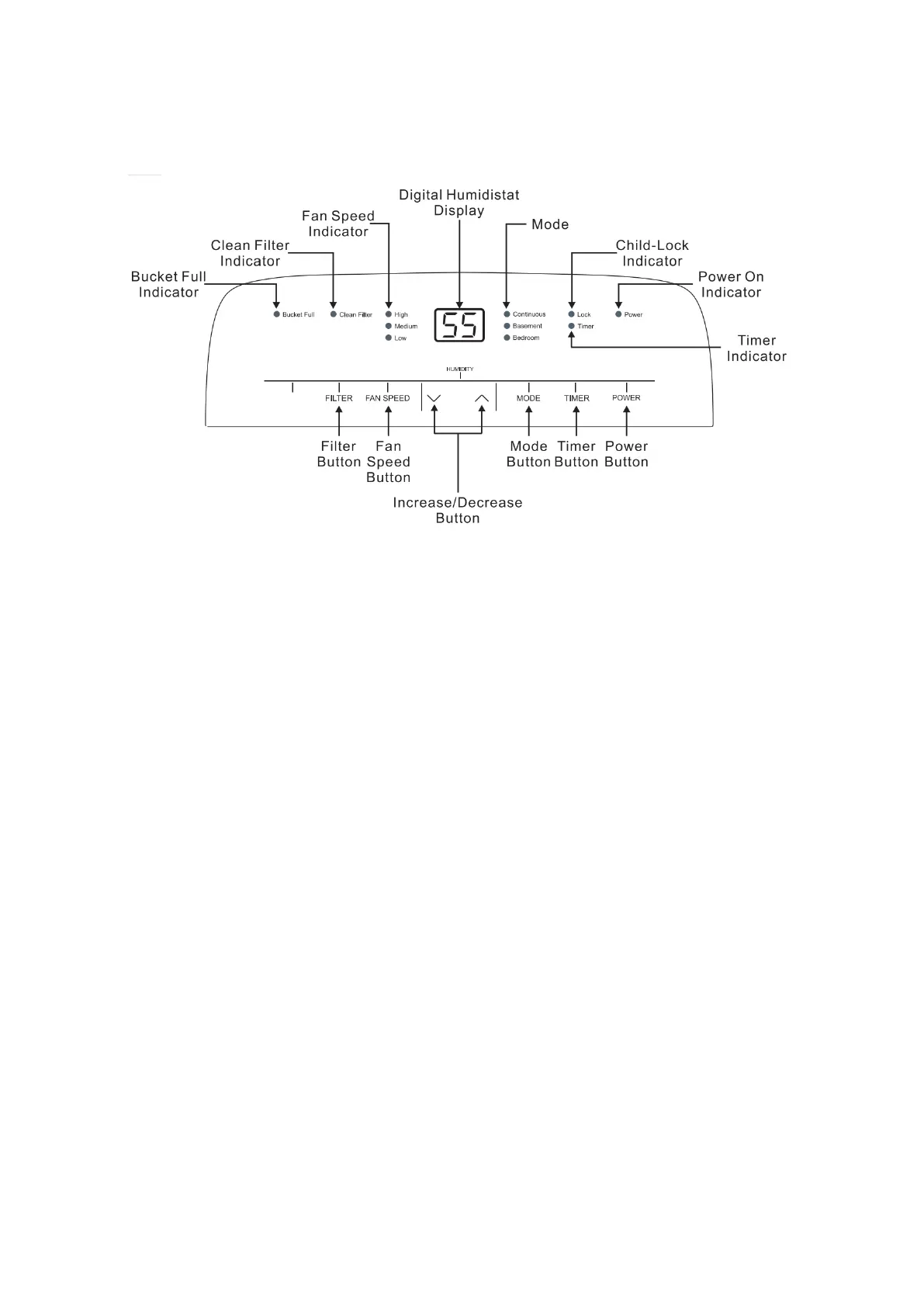
CONTROL PANEL
CONTROL PANEL
1) When first operating the dehumidifier, run it in Continuous mode for 24 hours.
2) Power On and Off- Press the POWER button once to manually turn the unit on. Press the POWER button once more to
turn the unit off.
3) Humidity Selection - Press the ∨or ∧ buttons to choose the desired relative humidity in the room. Each press of the
button will change the desired room humidity by 5%. The room humidity can be set from 35%-80%, or continuously. The
unit will cycle on and off to maintain the humidity level chosen on the digital display. lf you want the dehumidifier to
operate continuously regardless of the room humidity, press the MODE button until you see “CO” on the digital display.
This will enable continuous operation and the “Continuous” indicator will light up on the control panel.
4) Fan Speed Control - Press the FAN SPEED Button to cycle through the different fan speeds: High, Medium, and Low.
The fan speed can be visually distinguished by the fan speed indicators on the control panel.
5) Timer Auto On- To program the unit to automatically turn on, press the TIMER button when the unit is off. Press the
∨or ∧ buttons to increase or decrease the timer in 30 min increments (0.5 hours) up to 10 hours. After 10 hours, each
press of the button will increase the timer in 1 hour increments up to 24 hours. Once the desired time is reached, the
unit will automatically turn on.
Timer Auto Shut-Off- To program the unit to automatically turn off, press the TIMER button when the unit is on. Each
press of the or buttons will change the timer setting in 30 min increments (0.5 hours) up to 10 hours. After 10 hours, each
press of the or buttons will increase or decrease the timer in 1 hour increments up to 24 hours. Once the desired time is
over, the unit will automatically power off.
NOTE: Fan will continue to run even when the compressor is off. This is normal and allows the unit to circulate air and
operate more efficiently.


 To Next Page