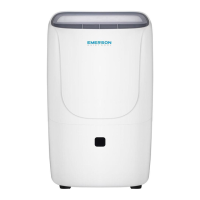
This document describes the EMERSON QUIET KOOL Dehumidifier, an appliance designed to reduce humidity in indoor spaces, combining high-efficiency operation with portable convenience. The dehumidifier is available in models EAD30E1, EAD50E1, and EAD70E1.
Function Description
The primary function of this dehumidifier is to remove excess moisture from the air, helping to prevent issues like mold, mildew, and general dampness. It operates by drawing in moist air, passing it over cooling coils to condense the moisture, and then expelling drier air back into the room. The collected water is stored in a removable bucket or can be continuously drained via a garden hose connection.
The dehumidifier features a control panel that allows users to manage various settings. It includes a digital humidistat display to show the current humidity level and allows for the selection of a desired relative humidity between 35% and 80%. Alternatively, a "Continuous" mode can be selected for non-stop operation, regardless of the room's humidity level. The unit also offers pre-set modes for specific locations like "Bedroom," "Living Room," or "Basement," optimizing performance for different environments.
An automatic defrost function is integrated to prevent frost buildup on the evaporator coils. When frost is detected, the compressor cycles off, and the fan continues to run until the frost disappears, after which normal dehumidification resumes.
For safety, the unit includes a "Bucket Full" indicator and an automatic shut-off feature. When the water bucket is full or removed, the unit will beep, the indicator will light up, and the compressor will turn off, though the fan may continue to run for a few minutes. The dehumidifier will not operate until the bucket is emptied and properly reinserted. A child-lock mode is also available to prevent accidental changes to settings.
Usage Features
To begin operation, it is recommended to run the dehumidifier in "Continuous" mode for the first 24 hours. The unit is turned on and off using the POWER button. Humidity levels can be adjusted in 5% increments using the up/down arrow buttons.
The fan speed can be controlled, offering "High," "Medium," and "Low" settings, which are indicated on the control panel.
A timer function allows for both automatic turn-on and shut-off. When the unit is off, the TIMER button can be used to program an auto-on time, adjustable in 30-minute increments up to 10 hours, and then in 1-hour increments up to 24 hours. Similarly, when the unit is on, the TIMER button can be used to program an auto-shut-off time with the same increment options.
For optimal performance, the dehumidifier should be placed on a smooth, level floor surface capable of supporting the unit with a full bucket of water. It requires at least 12-18 inches of airflow on all sides. The unit is designed for indoor use only and should not be operated in temperatures below 41°F (5°C) to prevent coil freezing and reduced performance. For maximum effectiveness, all doors, windows, and other outside openings to the room should be closed.
The dehumidifier can be used in various areas with excessive moisture, such as cooking, laundry, bathing, and dishwashing areas, or in basements to prevent moisture damage to books or valuables. It should be kept away from direct air flow to pets or house plants.
For continuous drainage, a standard garden hose (not included) can be attached to the continuous drainage port on the back of the unit. The hose should be led to a floor drain, ensuring there are no kinks or knots, and the unit should be set to "CONTINUOUS" mode. Proper hose installation and a level surface are crucial to prevent the bucket from filling up and shutting off the unit.
Maintenance Features
Regular maintenance is essential for the dehumidifier's longevity and efficient operation. Before any maintenance, the unit must be turned off and unplugged from the electrical outlet.
The air filter needs regular cleaning. An indicator light will illuminate after 250 hours of use to signal that the filter requires cleaning. To clean, remove the filter from the back of the unit by pressing down on the filter tabs. Wash the filter with warm, soapy water, dry it thoroughly, and then replace it. After replacing, press the FILTER button to reset the indicator. It is crucial not to operate the dehumidifier without the filter securely in place, as this can damage the unit. The filter should not be cleaned in a dishwasher.
The water bucket should be cleaned every few weeks to prevent the growth of mold, mildew, and bacteria. A mild detergent can be used, followed by thorough drying before reinserting it into the unit. When emptying the bucket, it should be held with both hands. It's important not to place a full bucket on the floor due to its uneven bottom.
The unit housing can be cleaned with a damp cloth and dried with a soft towel. It should not be exposed to direct sunlight to prevent color fading. Harsh detergents, wax, or thinner should not be used for cleaning.
For extended storage or transport, the unit should be turned off, unplugged, and any excess water emptied. The filter should be cleaned or replaced, and the unit should be stored in a cool and dry place.



 To Next Page
 General