• Installing the battery should only be performed by
trained personnel and in a non-hazardous
location.
• If the QuickPanel
+
is VESA mounted, detach from
the VESA arm when replacing the battery. Refer to
the section, Mounting on a VESA arm.
• The battery should only be installed when the unit
is powered off.
• Care should be taken to protect and insert the
battery with correct polarity.
• Do not use any metallic item to remove the
battery (such as screwdrivers, knives, pliers, and
so forth).
• Be careful to not drop the battery or any
associated screws into the unit.
• Be careful of edges on internal sides of the
enclosure and frame.
➢ To install the battery
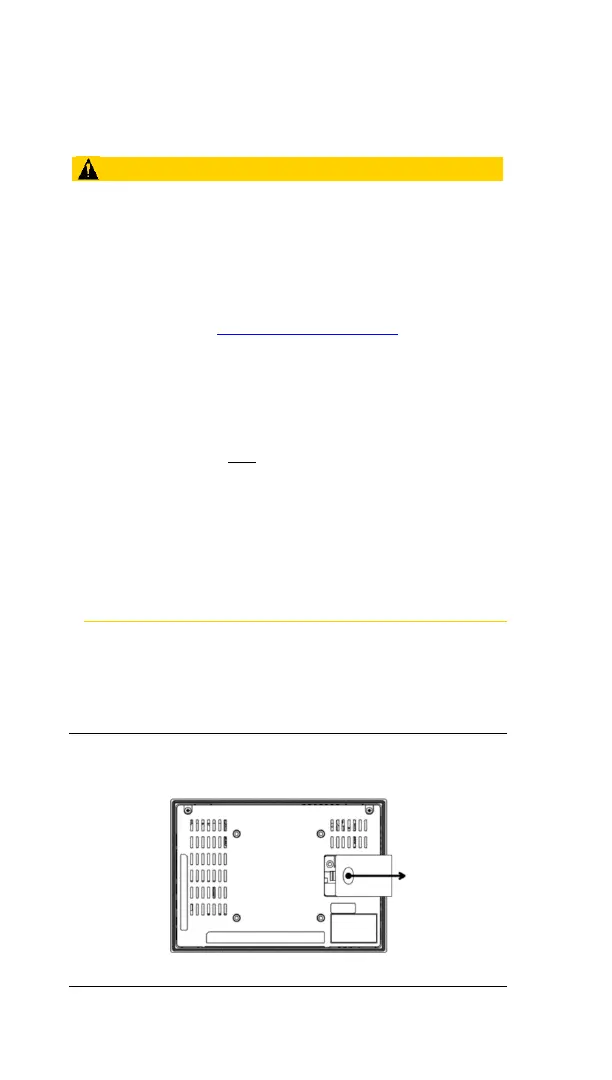
1. Remove the battery cover by pressing down
while sliding outward.
Figure 3.1: IC755CxS06RDx/ IC755CxW07CDx Battery
Cover Removal


 To Next Page
 Loading...