Quick Start Guide Section 3
GFK-2893P Sep 2019
Initial Startup 15
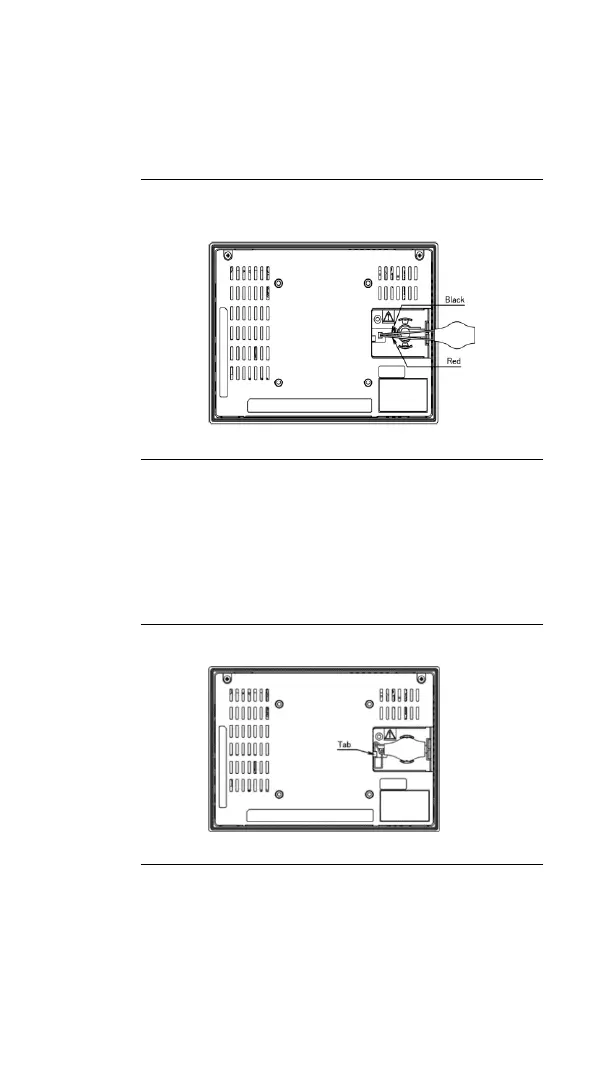
2. Connect the battery harness connector to the
header, noting keyed orientation.
Figure 3.2: IC755CxS06RDx /IC755CxW07CDx
Battery Harness Connection
3. Verify that positive (red) is down and negative
(black) is up.
4. Wrap the harness connector around to match
the following figure. Do not let the harness
connector go above the tab.
Figure 3.3: Harness Connector Orientation
5. Slide the battery cover into place, taking
care not to pinch the harness connector.


 To Next Page
 Loading...