The EMFields Acoustimeter AM-11 is a radiofrequency (RF) Electromagnetic Field (EMF) meter designed to help users quickly and accurately assess RF EMF levels in their environment. It measures RF EMF sources from 200 MHz to 8000 MHz (8 GHz), covering most modern wireless communication RF signals.
Function Description
The Acoustimeter AM-11 measures and displays two key aspects of RF exposure: Peak Signal Strength and Average Power Flux Density (PFD). Peak Signal Strength, measured in volts per metre (V/m), represents the electric field strength and is shown on the left column of LEDs and the top line of the OLED display. Average Power Flux Density (PFD), measured in microwatts per square metre (μW/m²), represents the time-averaged power and is shown on the right column of LEDs and the bottom line of the OLED display.
The device is sensitive and intended to measure typical modern environmental exposures, including mobile phone networks (2G, 3G, 4G, 5G), local wireless networks such as WiFi (2.4 and 5 GHz), digital cordless phones (DECT), and many other sources of RF energy. It also features an audio output that allows users to hear amplitude changes in incoming signals, aiding in the identification of the signal type and source. Most modern digital EMF sources are "pulsed" and produce distinct sounds, while non-amplitude modulated analogue sources will produce less sound. The meter can even pick up voices and music from powerful broadcast AM radio transmitters, although these are outside its normal frequency detection range.
The Acoustimeter AM-11 is designed to provide quick and informed judgments about RF EMFs, helping users identify "hot-spots" due to reflections, making both the position and orientation of the instrument crucial for accurate readings.
Important Technical Specifications
- Frequency Response: 200 MHz – 8000 MHz (8 GHz) ± 6dB ± 0.02 V/m using the internal antenna.
- Measurement Range:
- LCD Display: Shows peak-hold, peak, and average values, updated approximately 2.5 times per second.
- Peak Readings: 0.02 - 6.00 V/m.
- LED Scale (Peak): 15 levels, from 0.02 to 6 V/m, updated 5 times per second.
- Average Readings: 1-100,000 μW/m².
- LED Scale (Average): 15 levels, from 1 to 100,000 μW/m², updated 3 times per second.
- Note: 100,000 μW/m² equals 10 μW/cm².
- Audio: Can be heard at levels below 0.02 V/m.
- Power:
- Current: 100 to 150 mA at 3 volts.
- Batteries: 2xAA 1.5V Alkaline or NiMH 1.2V rechargeable cells.
- Battery Life: Typically 15 hours (alkaline) and up to 25 hours (NiMH 2000+ mAh cells). A 'Low battery' indicator is included.
- Working Temperature Range: -20 °C to +40 °C.
- Dimensions: 190mm x 102mm x 33mm.
- Weight: 280g (without batteries), 330g (with batteries).
The Acoustimeter AM-11 measures RF EMFs from 200 MHz to 8000 MHz, covering a wide array of modern wireless technologies. It does not measure Dirty Electricity, Smart Meters using Power-Line Communication (PLC), Near-Field Communications (NFC), house wiring, power-frequency magnetic or electric fields (for which a PF5 meter is recommended), passive UHF RFID tags, LF/HF RFID, shop safety tags, or GPS receivers, as these do not radiate RF EMFs within its detection range or are outside its scope.
Usage Features
The Acoustimeter AM-11 is designed for ease of use with a clear OLED display and two series of graduated LED lights for rapid level assessment and hot-spot identification.
Layout:
- OLED Display: Shows numerical readings.
- Peak Signal LEDs: Left column of LEDs for V/m readings.
- Average Power LEDs: Right column of LEDs for μW/m² readings.
- Volume Controls: Two buttons (+ and -) for adjusting audio volume across 5 preset levels.
- Clear (Peak) Hold Button: Resets or clears the peak hold reading.
- Power Button: Turns the device on and off.
- Internal Antenna Location: Top section of the device.
- Loudspeaker: Located on the back of the device for audio output.
- Battery Compartment: Located on the back for 2x AA cells.
Operation:
- Setting Up: Ensure 2 AA batteries are correctly installed. Press the POWER button. The device will display a moving LED pattern and an "Acoustimeter Initialising..." message on the OLED. Audio is off by default and can be adjusted using the VOLUME + and - buttons.
- Taking Measurements: The instrument displays peak signal strength (V/m) and average power flux density (PFD) (μW/m²) on both the LEDs and LCD. To obtain the most accurate reading, slowly rotate the instrument in each direction to find the highest reading, then hold it still.
- Holding the Meter: Ideally, hold the meter as shown in the manual's illustration, keeping it at least 30cm away from your body and hands towards the bottom of the instrument. It can also be placed upright on a surface.
- Peak-Hold Function: This function displays the highest peak reading measured until the instrument is turned off and on again, or until the CLEAR (PEAK) button is pressed.
- Auto-Off: The AM11 will automatically turn off after 8 minutes of inactivity to conserve battery.
- Audio Feature: The audio output helps identify the type and source of RF signals. Pulsed digital signals produce distinct sounds, while analogue signals may produce less sound. Very quiet sounds when no LEDs are illuminated are typically due to internal meter functioning and should be ignored, though pulsing RF signals can still be heard even at low display readings (<0.02 V/m and < 1 µW/m²).
Troubleshooting:
- Meter not working: Check battery installation and charge. If the OLED displays a reading, the meter is on and working.
- Loud double-beep: Indicates a "Low battery" message. Replace batteries.
- Readings vary with movement: RF EMFs reflect off surfaces, creating "hot-spots." Movement reveals these real exposure spots.
- High peak, low average: Common for wireless technology using 'pulsed' digital signals.
- Readings vary when still: Regular "blips" may indicate a rotating radar or Wi-Fi signal. Irregular high readings can be from mobile phones transmitting data or "Internet of Things" (IoT) devices producing intermittent signals.
- Average power display mismatch: Some meters incorrectly convert peak signals to average power for modern signals. The AM11 scales are correctly related.
- Quiet hissing/burbling noise with no LEDs: Internal electronic circuitry noise, not external signals, occurring below 0.02 V/m and 1 µW/m².
- Noise when shielded: Screening material may be degraded, or small gaps allow RF signals to pass through. Even a 30 dB reduction will still show and sound on the meter.
- Mobile phone shows 1 bar, AM11 reads low: Mobile phones are highly sensitive and can work with extremely low base-station signals. "1 bar" typically means less than 0.001 V/m.
Maintenance Features
- Cleaning: The case should be cleaned using a damp cloth. Do not use chemicals.
- Servicing: The instrument is not intended to be serviced by the user and does not require special maintenance. Unscrewing the case may void the guarantee.
- Durability: The instrument is not waterproof and should not be used outdoors in the rain without protection (e.g., a clear plastic bag). Avoid exposing it to high temperatures or dropping it on hard surfaces to prevent damage.
- Warranty: The Acoustimeter comes with a 5-year return-to-base warranty, covering manufacturing defects but not wear from normal use, water damage, or physical impacts.
- Recycling: In accordance with the European WEEE Directive, unwanted electronic equipment can be returned to EMFields Solutions Ltd for recycling.

 Need help?
 General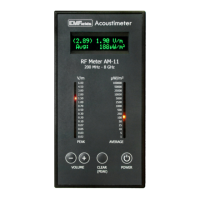

 To Next Page
