49
Indications on the display
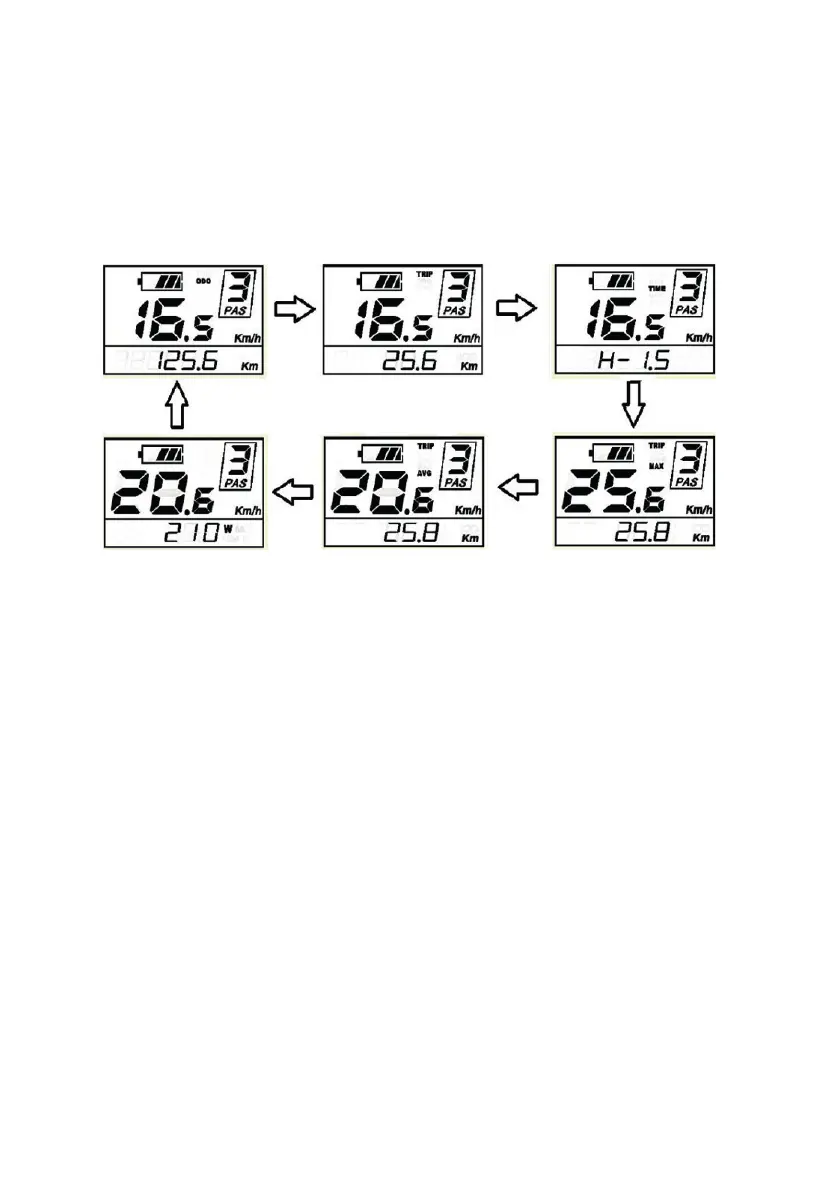
The display shows the speed in real time, the assistance level set and the bat-
tery charge status.
Pressing the “M” key it is possible to view in the lower part in sequence the total
mileage (ODO), the mileage of the single trip (TRIP), the journey time (TIME),
the engine power (W POWER), the speed maximum speed (MAX) and average
speed (AVG).
Trip data reset, backlight adjustment, units
By pressing and holding the “+” and “-” keys simultaneously, you access the
settings menu where you can make various adjustments:
Resetting of the mileage indications of the single trip (TRIP), journey time
(TIME), maximum speed (MAX SPEED), average speed (AVG SPEED). When the
word TC appears on the display, press the “+” or “-” keys and select “Y”, confirm
with the M key to reset.
Backlight adjustment, you can choose 3 brightness levels. When the word BL
appears on the display, press the “+” or “-” keys and select 1,2,3 which corre-
spond to dierent brightness levels, confirm with the M key.
Selection of the unit of measure (Km or miles). When the word U appears on the
display, press the “+” or “-” keys and select MPH or KM/H, confirm with the M
key.
To exit the settings menu, press and hold the M key.
tasto MODE per 2 secondi. Parcheggiando la e-bike per più
di 10 minuti, il sistema si spegnerà automaticamente.
Interfaccia display
Accendendo il display, verranno mostrati i seguenti
parametri:
- Velocità
- Distanza totale
- Batteria
- Livello della pedalata assistita
Per modificare le informazioni mostrate, premere il tasto
MODE. Verranno visualizzati i seguenti parametri in
quest’ordine: Velocità (km/h) Distanza di viaggio (km)
Tempo trascorso in viaggio (ore) Velocità massima
(km/h) Velocità media (km/h) Potenza motore (W)
Velocità (km/h)
Modalità Cruise Control
Per attivare la funzione “Cruise Control”, tenere premuto il
tasto GIU’.


 To Next Page