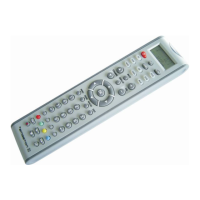
1. Press the device key (e.g. TV ) which the command you like to delete from.
2. Press and hold the SET key for more than 3 seconds, then release it.
3. Press or to select „LEARNING” and confirm by OK key. Select „DELETE
KEY”, press the key which should be deleted, „SURE DELET“ appears, confirm then by
OK key, LCD shows “Success!”, the key is deleted.
4. Repeat step 3 to delete next keys, exit to the normal mode by pressing the device
key.
DELETE ALL LEARNT KEYS OF A DEVICE
1. Press and hold the SET key for more than 3 seconds, then release it.
2. Press or to select „LEARNING” and confirm by OK key. Select „DELETE
DEV”, press the device key which should be deleted, „SURE DELET“ appears, confirm
then by OK key, LCD shows “Success!”, all keys of selected device are deleted.
3. Repeat step 2 to delete next devices, exit to the normal mode by pressing the EXIT
key.
DELETE ALL LEARNT KEYS
1. Press and hold the SET key for more than 3 seconds, then release it.
2. Press or to select „LEARNING” and confirm by OK key. Select „DELETE
ALL”, „SURE DELET“ appears, confirm then by OK key, LCD shows “Success!”, all
keys are deleted.
SET UP MACRO
1. Press and hold the SET key for more than 3 seconds, then release it.
2. Press or to select „MACRO” and confirm by OK key.
3. Press or to select „MACRO1”, „MACRO2” or „MACRO3” and confirm by
OK key.
4. LCD shows “SET UP”, confirm by OK key, LCD shows „SELECT KEY“.
5. Press the device, then the function in a sequence (e.g. TV+POWER+AV,
DVD+POWER, etc). This means you want to turn the TV(Device) power on(function),
input toAV(function) and DVD(Device) power on(function).
6. After setting of maximum 10 keys, confirm by OK key, LCD shows “Success!”, exit to
the normal mode by pressing the EXIT key.
RUN MACRO
1. Press and hold the MACRO key and press one of the 1, 2, 3 keys.
DELETE MACRO
1. Press and hold the SET key for more than 3 seconds, then release it.
2. Press
or to select „MACRO” and confirm by OK key.


 To Next Page
 Loading...