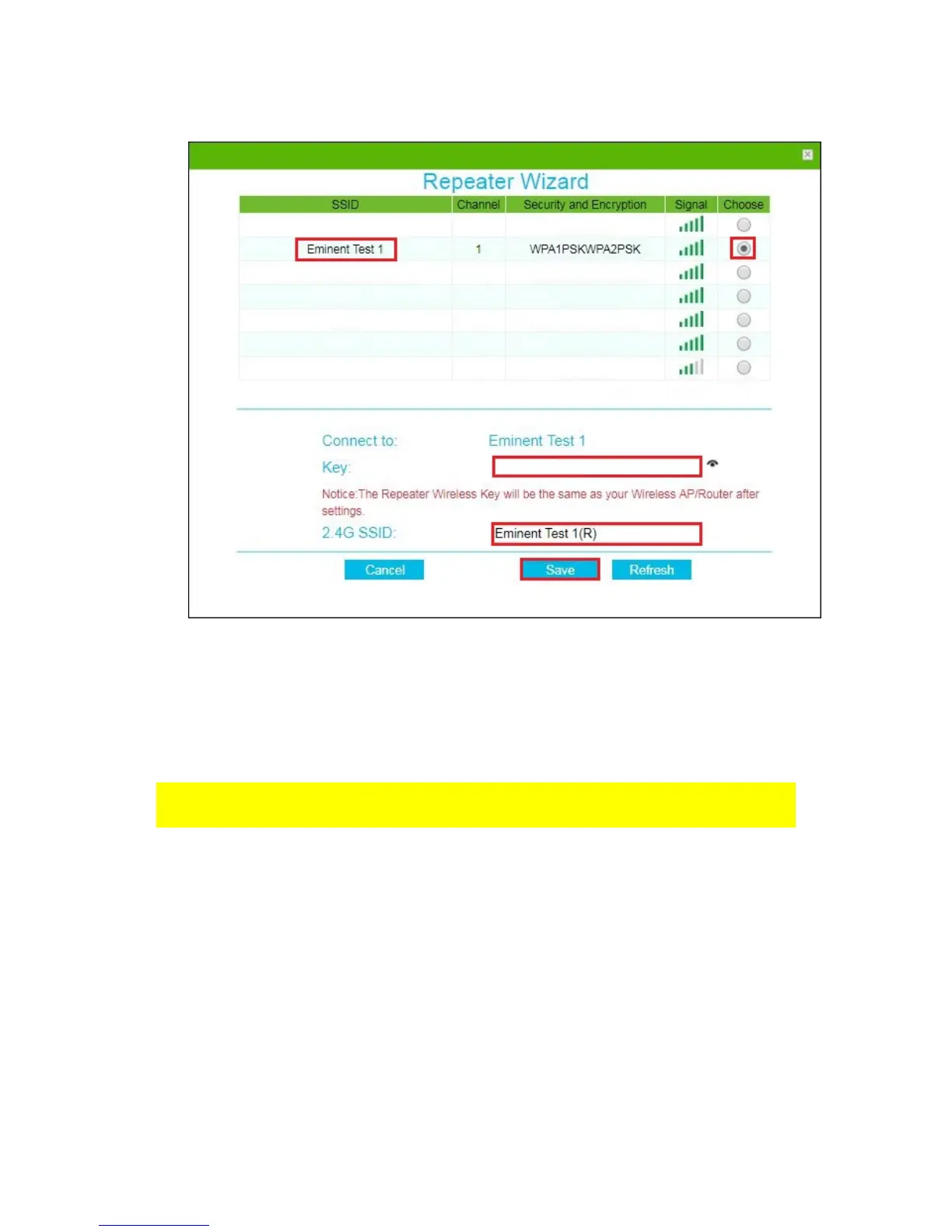
9. You may notice that the repeater will automatically make a new Wi-Fi SSID name
for 2,4GHz. Enter the security key of your wireless network in the Wi-Fi “Key” field.
10. Click “Save”, the EM4594 will reboot and connect to your router.
11. You can now connect your wireless network adapter(s) to the new made Wi-Fi
SSID and entering the wireless encryption key of the wireless network you
previously connected.
Note: After the settings have been applied, the EM4594 will reboot. Your device will no
longer be connected to the wireless network SSID of the EM4594.
4.0 Access Point mode
1. Connect the EM4594 to a wall outlet (preferably close to the modem/router).
2. Wait for the LED to turn blue (flashing). This will take approx.. 1 minute.
3. Connect to the EM4594 via Wi-Fi SSID: Eminent_repeater, or use the Ethernet
cable to connect directly from your PC LAN port to the EM4594 “LAN” port.
4. Open your internet browser and type http://192.168.10.1 in your internet browser
and then hit Enter.
5. The login screen will appear. Enter the Username: “admin” and Password:
“admin”, then click “Login” to login.



 To Next Page