10 | ENGLISH
Image 8
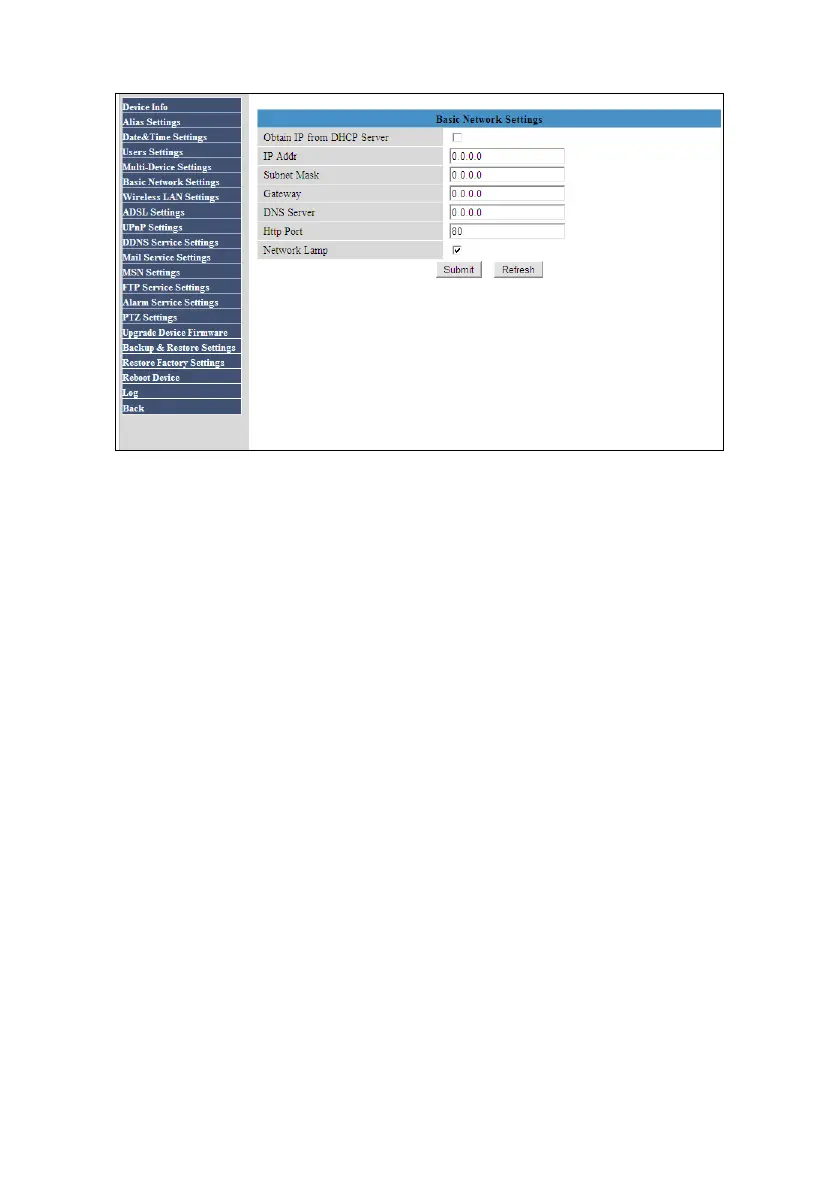
4. Fill out an IP-Address at ‘IP Addr’. Make sure this IP-Address is in the same
range as the IP-range of your current network and this IP-Address is not already
in use. For example: If your network has a ‘192.168.8.x’ range, you may fill out
‘192.168.8.54’ as IP-Address.
5. Fill out a subnet mask at ‘Subnet Mask’. This subnet mask needs to be the same
as is used within your own network. For example: If your network has a
‘192.168.8.x’ range, you may fill out ‘255.255.255.0’ as ‘Subnet Mask’.
6. At ‘Gateway’ you need to fill out the correct gateway-address of your network.
This usually is the IP-Address of your router. For example: If your router has IP-
Address ‘192.168.8.1’, you may fill out ‘192.168.8.1’ as Gateway Address.
7. At ‘DNS Server’ you can usually fill out the ‘Gateway’ number. For example: If
your router has IP-Address ‘192.168.8.1’, you may fill out ‘192.168.8.1’ as DNS
Address. You can also fill out a DNS server which is in use by your ISP.
8. ‘HTTP Port’ can usually remain at port ‘80’. However, if another device is already
using port 80, you can choose to change this port with another port number. For
Example: ‘8080’.
9. If correct, you will have filled out the settings as shown in the following image:
(Please note your own network may use another IP-Range and Subnet Mask)



 To Next Page