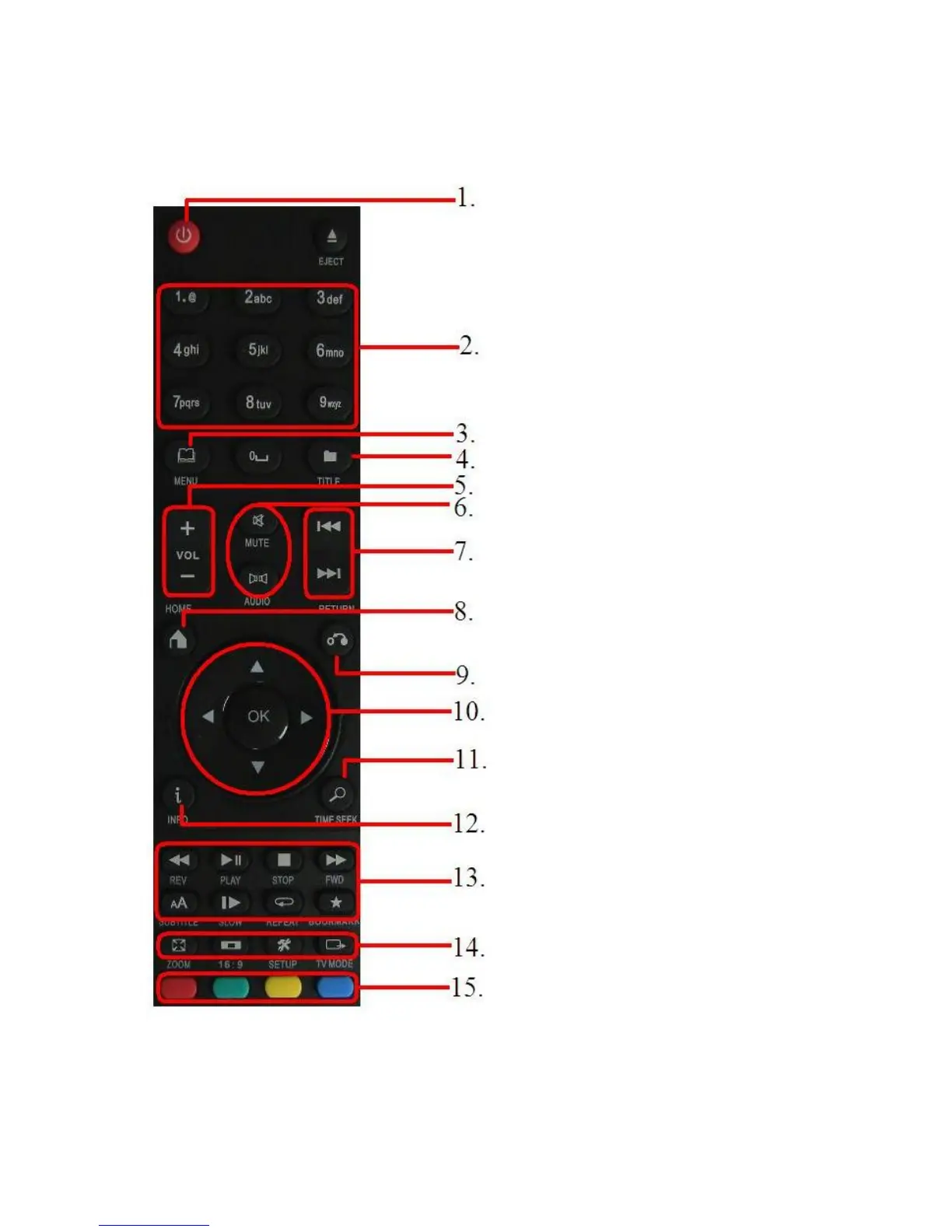
2.0 Explanation of the remote control
1. On/off: button to turn on or turn off
the media player.
2. Numeric buttons: Mainly used to
jump to the corresponding chapter
number.
3. Menu: Mainly used to select views
and to select a 3D view while playing
a 3D video file.
4. Title: Access the title menu of the
movie (if supported).
5. Volume: Used to increase or
decrease the sound volume.
6. Mute/audio: Used to mute the sound
or select the audio stream.
7. Previous/next: Used to select the
next (audio) file.
8. Home: Return to the main menu.
9. Return: Return to a previous step.
10. Navigation: Buttons to navigate
through the menu options.
11. Time seek: Used to select a specific
timeframe.
12. Info: Shows information about the
played file.
13. Function buttons: Used when
playing files Play/start, stop,
forward etc.
14. System buttons: Used to select the
zoom function, aspect ratio, enter the
settings menu and change the
resolution.
15. Colored buttons: Mainly used while
using the ‘File manager’ function.
Also, movie posters can be selected
using the colored buttons.
Image 1 – Remote control



 To Next Page