3.0 Explanation of the connections
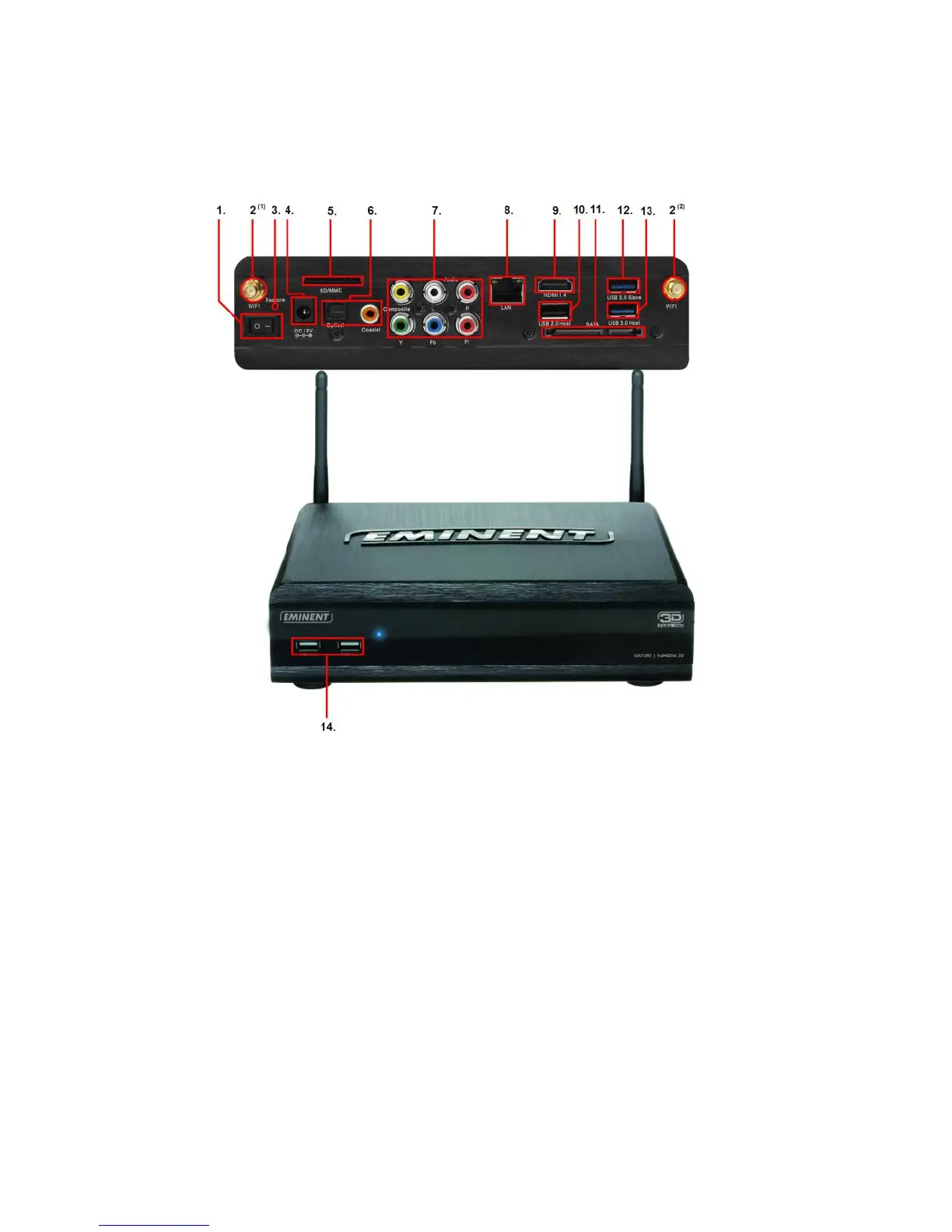
3.1 Connections of the EM7385
Image 2 – Connections EM7385
1. On/Off switch: Used to switch the media player on and off.
2. WIFI connection(s): Connect the antenna’s to the two WIFI connectors.
3. Restore: Can be used while performing a firmware update.
4. Power connection: Connection for the power cable (12V).
5. Card reader: Connection for external memory cards such as SD and MMC
cards.
6. Optical S/PDIF connection & Coaxial connection: Audio connection to
connect to your digital receiver.
7. Composite & component connections: Composite: Used to connect to an
analogue television (Yellow is video, red and white are audio connections) or
connect the red and white connections to an analogue receiver. Component:
Used to connected to a HD television with component connections.
8. Gigabit LAN: Connection used to connect to your (Gigabit) LAN network.
9. HDMI connection: HDMI 1.4 also known as HDMI High speed connection. Used
to connect to your HD television or HDMI receiver.



 To Next Page