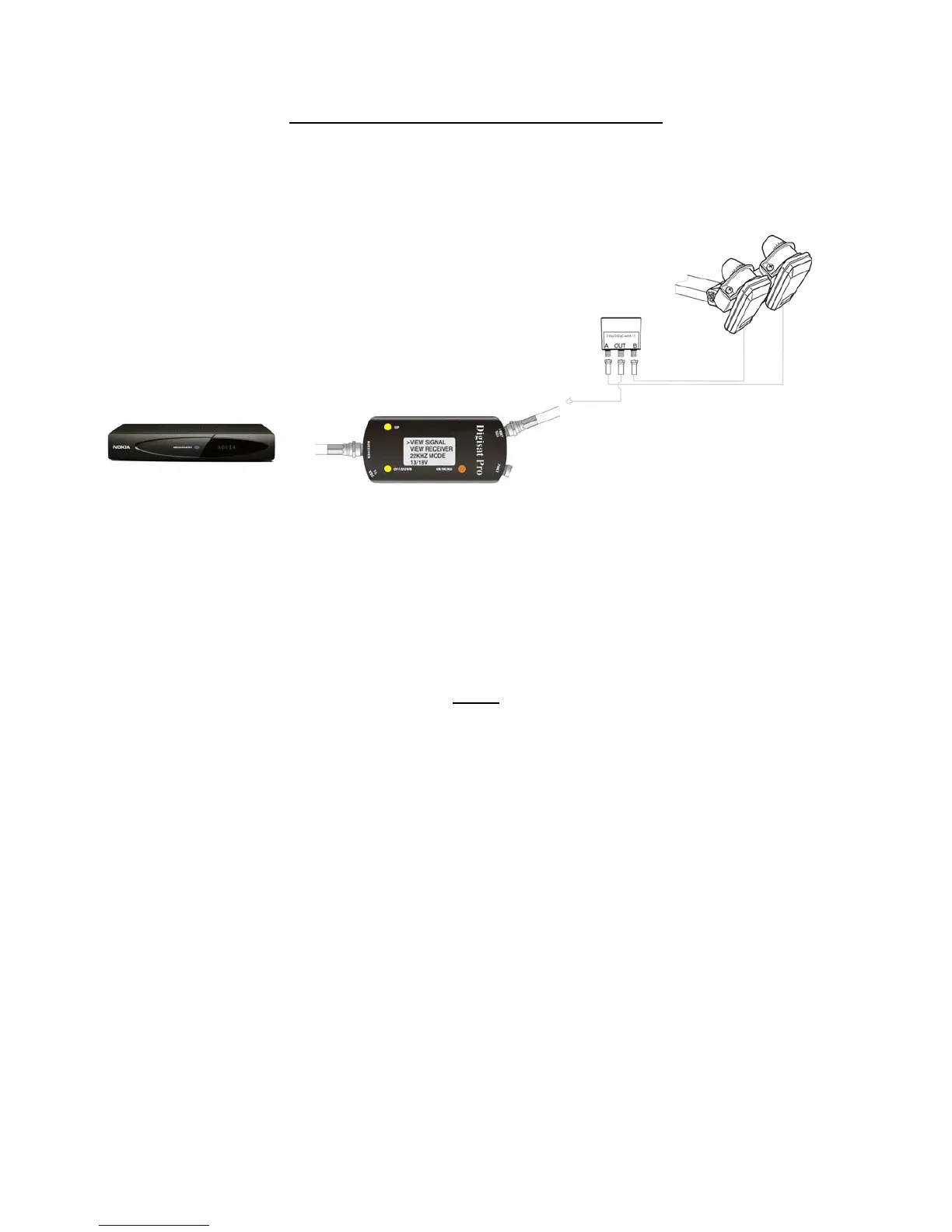
How to use DIGISAT PRO with DiSEqC setup
This is an illustration of how to set up the DIGISAT PRO with a DiSEqC switch.
• Connect the Coax-cable from the LNBs with the DiSEqC switch A & B.
• Then connect the coax with the out connector from the switch to the LNB1 connector on the DIGISAT
PRO.
• Connect the coax from the DIGISAT PRO to your satellite receiver. The setup is done and if the dish
has been installed correctly, you should now be able to see picture from your satellite receiver. If there
is no picture, do the setup again and check that you have connected all the coax-cable correctly.
F.A.Q
Be aware of the fact that the DIGISAT PRO is an aid to aligning the antenna, it does not identify which satellite
you are looking at. It still takes basic knowledge of satellite elevation and azimuth to track and identify the
correct satellites. You can easily pick the wrong satellite, align the antenna and then discover that the receiver
indicates NO SIGNAL.
The DIGISAT PRO can be used with digital or analog LNBs. It also operates with both circular and linear
polarized LNBs. The only qualification is that the LNB must be down-converting to an I.F. Frequency of
900~2200 MHz (which is typical of most LNBs).
The DIGISAT PRO looks at the entire spectrum of signals received from the LNB and gives an overall
summation of the signal. It is not transponder / frequency selectable. If you need specific frequency selections,
EMITOR AB offers the SATLOOK DIGITAL NIT meter which can provide individual transponder information.
There is not an exact number meter reading which you should attempt to achieve. Your objective is to maximize
the meter reading so that the antenna and LNBs are providing the best signal possible.
The signal level reading indicated on the DIGISAT PRO will not be the same reading as you get on the satellite
receiver. These two readings can compliment each other (when one increases, the other one increases) but the
numbers will not be the same. The satellite receiver indicates interpreted data reception (forward error correction
information) while the DIGISAT PRO indicates overall gain of the LNBs.


 To Next Page