019
Infrared Remote Control
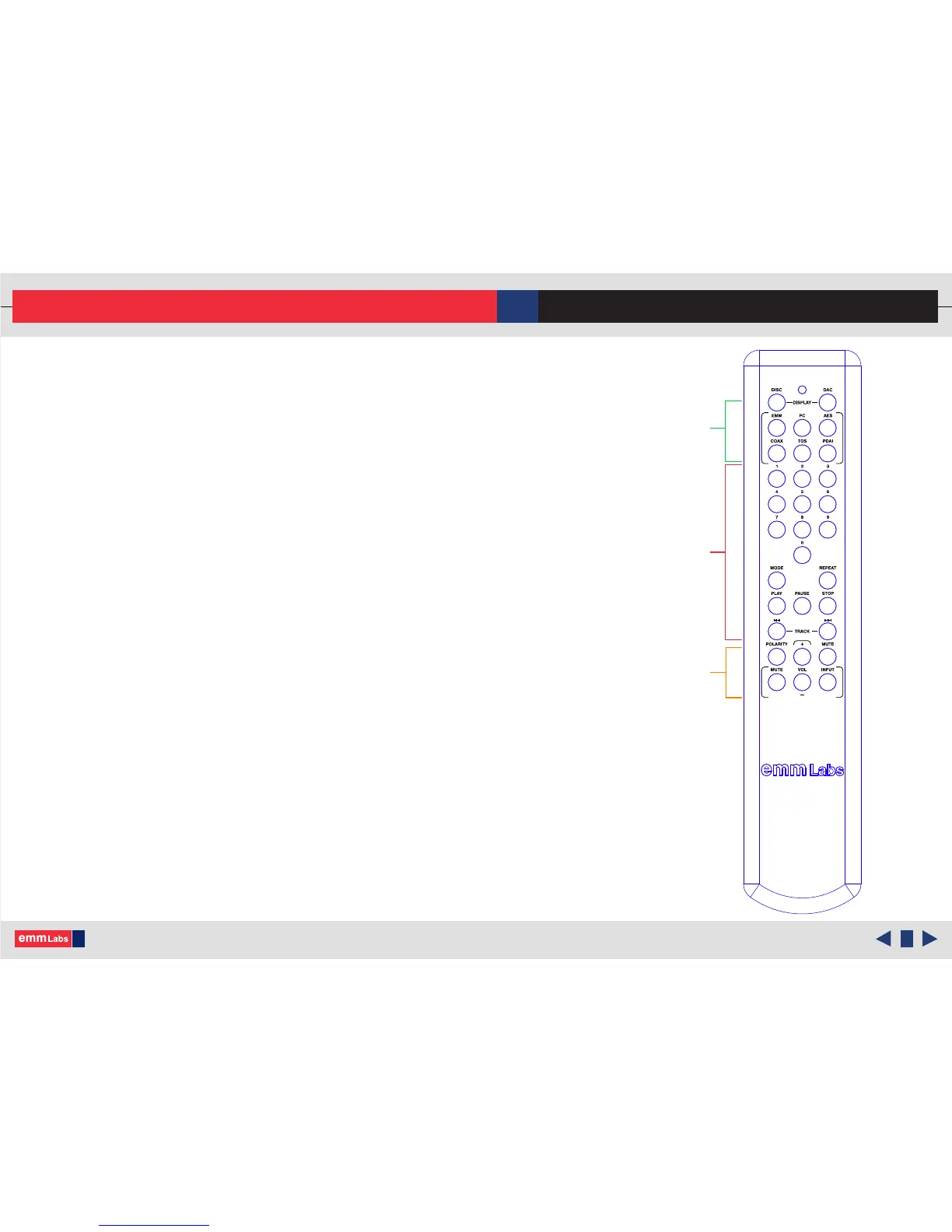
is function toggles the front panel preset display brightness
settings on DA2.
ese buttons are used to select the digital source input:
• EMM : Selects the EMM Optilink input.
• PC : Selects the USB Audio input.
• AES : Selects the AES/EBU input via balanced digital XLR
• COAX : Selects SPDIF input via digital COAX/RCA
• TOS : Toggles between the two TOSLINK SPDIF inputs,
TOS1 and TOS2.
• PDAI : Selects PDAI SPDIF digital input via COAX/RCA
Toggles the analog output polarity. Polarity inversion is performed
in the digital domain.
Mutes the DA2 outputs.
Use the transport functions shown to control an associated EMM
Labs transport when used with the DA2.
Use the VOL+, VOL- and MUTE buttons shown to control an
associated EMM Labs pre-amp when used with the DA2.
DAC:
INPUT:
POLARITY:
MUTE:
TRANSPORT:
PRE-AMP:
Infrared Remote Control
e remote control provides combined functions for both the DA2,
associated transport and some pre-amp functions. e functions that are
relevant to the DA2:
© 2015-2016 EMM Labs Inc., All Rights Reserved. EMM Labs reserves the right to amend specifications & design without notice.
DA2 AUDIO CONVERTER OWNER’S MANUAL
Transport
Pre-amp
DAC



 To Previous Page