29
3. Conrm the value by pressing LIGHT/SNOOZE.
4. The weather forecast icon will start ashing.
5. Set the icon based on the current weather using the + and – buttons. This is used to make the
forecast calculation more accurate.
6. Conrm by pressing LIGHT/SNOOZE.
Setting the Unit of Pressure/Daylight Intensity and Duration
Repeatedly pressing the BARO button will display:
1. Pressure in hPa.
2. Pressure in inHg.
3. Pressure in mmHg.
4. Daylight intensity in lux.
5. Daylight duration.
Setting the Rainfall Unit/Overview of Measured Values
Repeatedly pressing the RAINFALL button displays:
1. Rainfall for today in mm (TODAY).
2. Rainfall for yesterday in mm (YESTERDAY).
3. Rainfall in total in mm (TOTAL).
4. Rainfall for today in inches (TODAY).
5. Rainfall for yesterday in inches (YESTERDAY).
6. Rainfall in total in inches (TOTAL).
Long-pressing the RAINFALL button erases the memory of measured values.
Setting the Unit of Wind Speed
Repeatedly pressing the WIND button will display wind speed in miles per hour (mph) or in km per
hour (kmh).
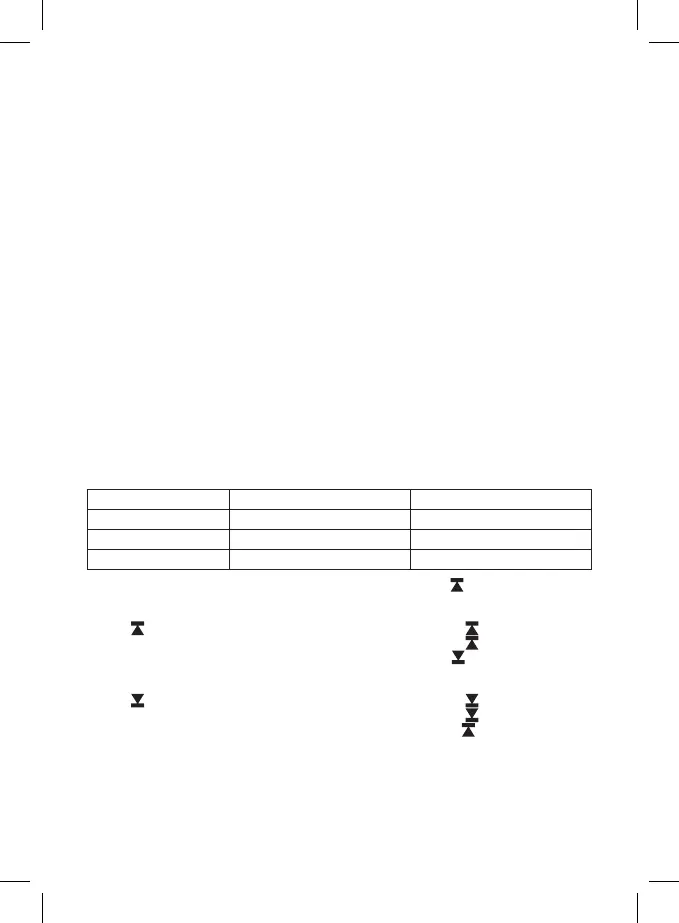
Setting Temperature Limits for Maximum and Minimum Temperature
Temperature limits can be set for both indoor and outdoor temperature.
Temperature Limit Ranges
OUTDOOR INDOOR
Minimum -40 °C to +69 °C -10 °C to 49 °C
Maximum -39 °C to +70 °C -9 °C to 50 °C
Resolution 1 °C 1 °C
1. Press the MODE button 3×. The maximum indoor temperature icon
will start ashing.
2. Long-press the MODE button – the temperature value will start ashing.
3. Use the + and - buttons to adjust the value and conrm by pressing MODE.
4. The
icon will start ashing; to activate the feature, press + or –; the icon will remain in the
screen. If you press + or – again, the feature will be deactivated – the
icon will be ashing.
5. Continue by pressing MODE; the minimum indoor temperature icon
will start ashing.
6. Long-press the MODE button – the temperature value will start ashing.
7. Use the + and - buttons to adjust the value and conrm by pressing MODE.
8. The
icon will start ashing; to activate the feature, press + or –; the icon will remain in the
screen. If you press + or – again, the feature will be deactivated – the
icon will be ashing.
9. Continue by pressing MODE; the maximum outdoor temperature icon
will start ashing.
10. The setting process is the same as the one used for setting indoor temperature limits.
When the set temperature limit is exceeded, an audio alarm will sound 5× every 55 seconds and
the value will start ashing.
Pressing any button (except LIGHT/SNOOZE) cancels the alert sound, but the icon of an active alert will
continue ashing. Once temperature drops below the set limit, the icon on the screen will stop ashing.



 To Next Page