31
3. DEW POINT – outdoor dew point
• Dew point is the temperature at which air becomes fully saturated with water vapour, which
then starts condensing in the form of water droplets.
4. WIND CHILL
• Apparent outdoor temperature, taking into account wind speed.
5. HEAT INDEX
• Apparent outdoor temperature, taking into account humidity.
Pressure/Temperature/Humidity/Rainfall Graph
Repeatedly pressing the GRAPH button will display:
1. BAROMETER – graph of pressure history in up to the last 72 hours.
2. IN TEMPERATURE – graph of indoor temperature history in up to the last 72 hours.
3. OUT TEMPERATURE – graph of outdoor temperature history in up to the last 72 hours.
4. IN HUMIDITY – graph of indoor humidity history in up to the last 72 hours.
5. OUT HUMIDITY – graph of outdoor humidity history in up to the last 72 hours.
6. RAINFALL – graph of rainfall history in up to the last 7 days.
Station Screen Illumination
1. When powered via adapter:
Permanent screen illumination is set automatically.
Repeatedly pressing the LIGHT/SNOOZE button will allow you to select between 2 modes of perma-
nent illumination (on/o).
2. When powered only by 3× 1.5 V AAA batteries:
Screen illumination is o. Pressing the LIGHT/SNOOZE button will turn screen illumination on for 10
seconds, then it turns o again. When the station is only powered by batteries, permanent screen
illumination cannot be activated!
Note:
The inserted batteries serve as backup for the measured/set data.
If batteries are not inserted and you unplug the adapter, all data will be erased.
Weather Forecast
The station uses changes in atmospheric pressure to forecast weather for the next 12–24 hours for
an area within the radius of 15–20 km.
The accuracy of weather forecast is 70 % – 75 %. The forecast icon is displayed in eld no. 8.
As the weather forecast may not always be 100 % accurate, neither the manufacturer nor the seller
can be held responsible for any loss caused by an incorrect forecast.
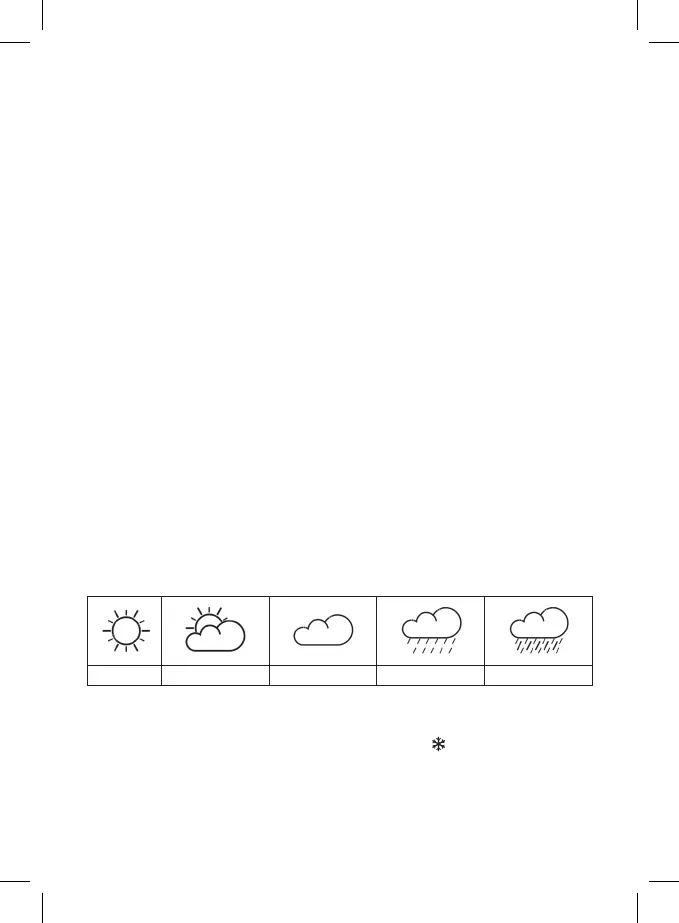
Weather Forecast Icons:
1 2 3 4 5
1 – sunny
2 – cloudy
3 – overcast
4 – rain
5 – heavy rain
At outdoor temperature between -1 °C and +1 °C, the glaze ice icon
will be displayed.
Upkeep and Maintenance
• Read the manual carefully before using this product.
• Do not expose the product to direct sunlight, extreme cold and moisture, and sudden changes in
temperature as these may compromise detection accuracy.
• Do not place the product in locations prone to vibration and shocks; these may cause damage.



 To Next Page