15
Boost – see Timed temporary change mode
Holiday – see Holiday mode
3. Schedule (see g. 7)
1 – add a time period
2 – delete a time period
3 – day display
7 days (Mon → Sun)
5+2 days (Mon → Fri + Sat → Sun)
24-hour
Every day can be divided into a maximum of 6 periods.
When in 7 day mode, you can copy the temperature settings from one day into
other days (see g. 8).
Example:
Long-press the Thursday icon; a menu of other days will open. Mark them orange
by tapping them and conrm.
Thursday‘s schedule will copy over to Monday, Tuesday and Wednesday.
4. Setting (see g. 9)
1 – reset the thermostat to factory settings
2 – key lock
3 – correction of ambient temperature (-3 °C to +3 °C in 0.5 °C increments)
4 – heating/cooling system mode
5 – calendar mode (7 days, 5+2, 24 h)
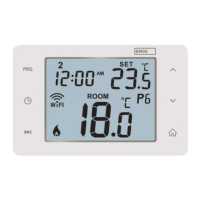
5. Thermostat mode icon
heating
cooling
o
6. Work mode icon
7. Adjust temperature
8. Current room temperature
9. Current set temperature
10. Adjust temperature
11. Network information about the device, change the name in the app,
location information, add an icon to the home screen and other similar
settings
Deleting the Thermostat from the App (see g. 10)
Long-press the thermostat icon, check o the thermostat and tap the dustbin
icon to delete the thermostat.
User Overview/Password Change/App Update
Tap the icon in the bottom right and then the icon in the top right.
This will open a new menu with settings.


 To Next Page