14
The individual power consumption values shown using bars are:
1BAR = 1 kWh
1BAR = 2 kWh
1BAR = 3 kWh
1BAR = 5 kWh
1BAR = 1 kWh × 10 (10 kWh)
1BAR = 15 kWh
1BAR = 2 kWh × 10 (20 kWh)
1BAR = 3 kWh × 10 (30 kWh)
1BAR = 5 kWh × 10 (50 kWh)
6. Actual consumption in days/weeks/ months
6.1. Actual power consumption in the last 7 days:
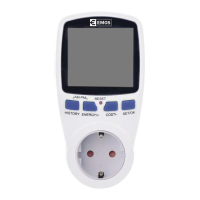
Hold the „HISTORY“ button for 3 seconds once the screen shows the „daily“ value.
Press „ENERGY/+“ or „COST/-“ to select the day you want to show. Display
-1 means yesterday, -2 two days ago etc. up to -7 aweek back. The real power consumption
is shown on the second line.
6.2. Actual power consumption in the last 7 weeks:
Hold the „HISTORY“ button for 3 seconds once the screen shows the „weekly“ value.
Press „ENERGY/+“ or „COST/-“ to select the week you want to show. -1 indicates last week,
-2 two weeks ago etc. up to -7 seven weeks ago. The real power consumption is shown on
the second line.
6.3. Actual power consumption in the last 7 months:
Hold the „HISTORY“ button for 3 seconds once screen shows the „monthly“ value.


 To Next Page