Page 10
Emotiva ERC-4
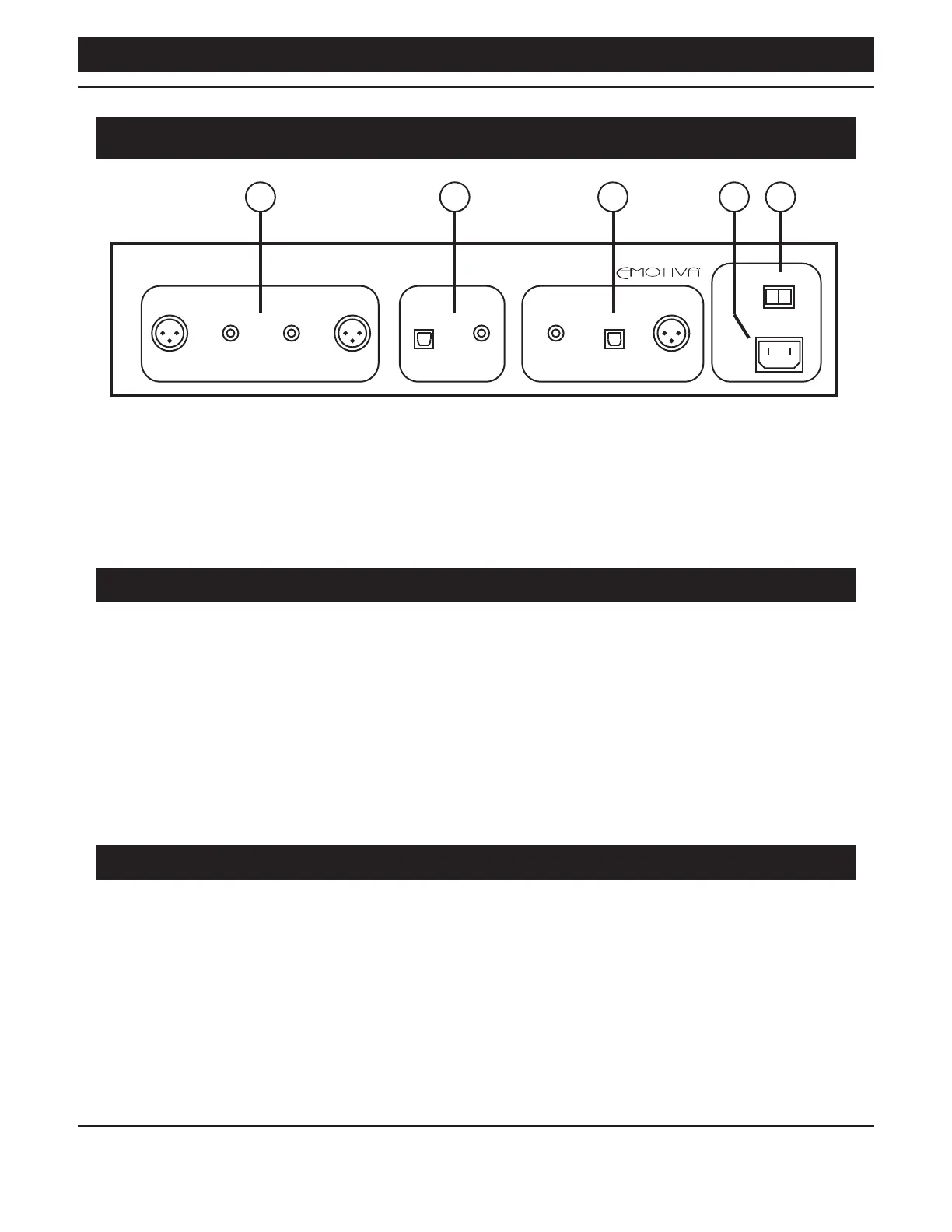
ERC-4 Rear Panel
1 5432
ANALOG OUTPUTS DIGITAL INPUTS DIGITAL OUTPUTS
BALANCED RIGHT R L BALANCED LEFT COAXIALOPTICAL OPTICALCOAXIAL AES/EBU
OFF ON
POWER
When playing standard Red Book audio CDs, all digital outputs on the ERC-4 are bit-perfect,
and will operate at the sample rate and bit depth of the CD being played (Red Book CDs are all
recorded at 44.1 kHz / 16 bits). When playing MP3 audio les, the digital audio will be output as
stereo PCM at 44.1 kHz / 16 bits (but the audio quality will depend on the bit rate at which the
MP3 les themselves are recorded).
1. Balanced (XLR) And Unbalanced (RCA) Analog Outputs
Connect these outputs to any balanced or unbalanced line level analog audio inputs on your
preamp or pre/pro.
Note: The analog outputs of the ERC-4 are xed level, and are designed to be connected to the
inputs of a preamp or pre/pro that includes a volume control. DO NOT connect the outputs of
the ERC-4 directly to the inputs of a power amplier that does not include a volume control;
damage to your amplier or speakers may result.
Note: On most preamps and pre/pros, all of the line level analog inputs are similar; so you can
use an input labelled Aux or Line In if your preamp doesn’t have an input labelled “CD”, or if
that input is already in use.
2. Digital Audio Inputs
Connect these to a digital audio output from your computer, whole home audio system, or other
digital audio source. The ERC-4 has both coax S/PDIF and optical (Toslink) S/PDIF digital audio
inputs. These inputs accept TWO CHANNEL PCM DIGITAL AUDIO from 16/44k to 24/192k.



 To Next Page