EasyManua.ls Logo

Empi EPIX VT - Page 14

Default Icon
32 pages
Print Icon
To Next Page IconTo Next Page
To Previous Page IconTo Previous Page
Loading...
User
Information
Belt
Clip
The
Belt
Clip
allows
you
to
wear
the
TENS
device
on
a
belt
or
pants
top.
If
the
Belt
Clip
is
not
already
attached,
securely
attach
it
to
the
device.
Open
the
lid
past
the
first
stop,
slide
the
Belt
Clip
on
the
bottom
of
the
lid
to
fit
the
groove,
pull
it
up
until it
engages
on
the
bottom
and
snap
the
top
catches
over
the
top
of
the
lid.
Covers
There
are
two
covers
for
the
Epix
VT
TENS
device.
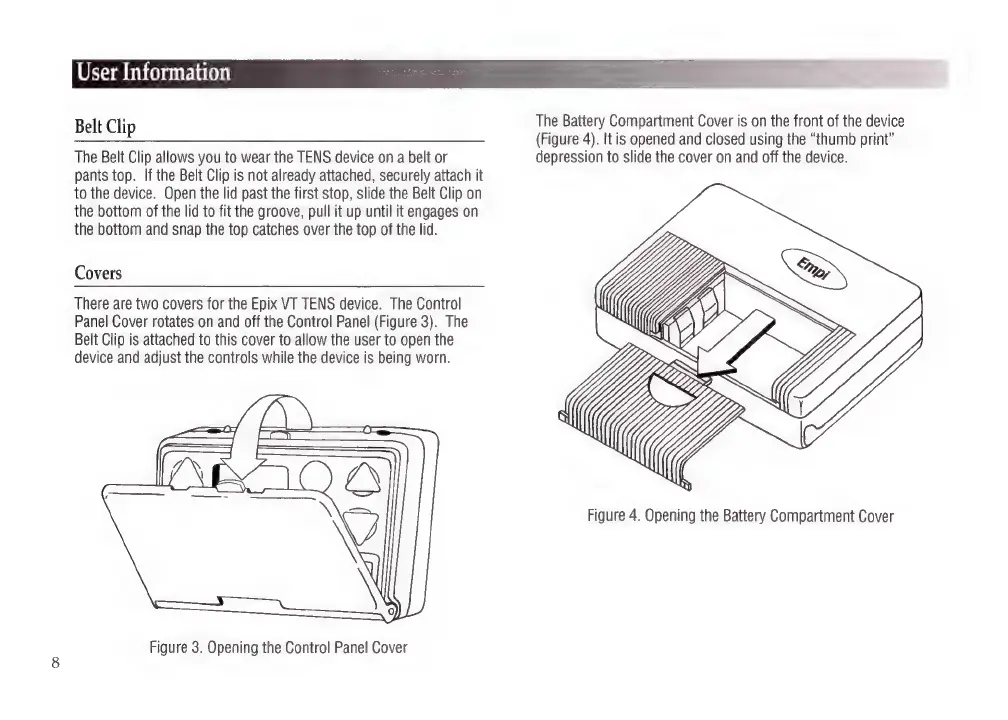
The
Control
Panel
Cover
rotates
on
and
off
the
Control
Panel
(Figure
3).
The
Belt
Clip
is
attached
to
this
cover
to
allow
the
user
to
open
the
device
and
adjust
the
controls
while
the
device
is
being
worn.
Figure
3.
Opening
the
Control
Panel
Cover
The
Battery
Compartment
Cover
is
on
the
front
of
the
device
(Figure
4).
It
is
opened
and
closed
using
the
“thumb
print”
depression
to
slide
the
cover
on
and
off
the
device.
Figure
4.
Opening
the
Battery
Compartment
Cover

Related product manuals