EasyManua.ls Logo

Empi EPIX VT - Program Option Controls; Battery Compartment

Default Icon
32 pages
Print Icon
To Next Page IconTo Next Page
To Previous Page IconTo Previous Page
Loading...
User
Information
Program
Option
Controls
Battery
Compartment
Epix
VT
offers
twelve
(12)
program
options.
Selecting
a
specific
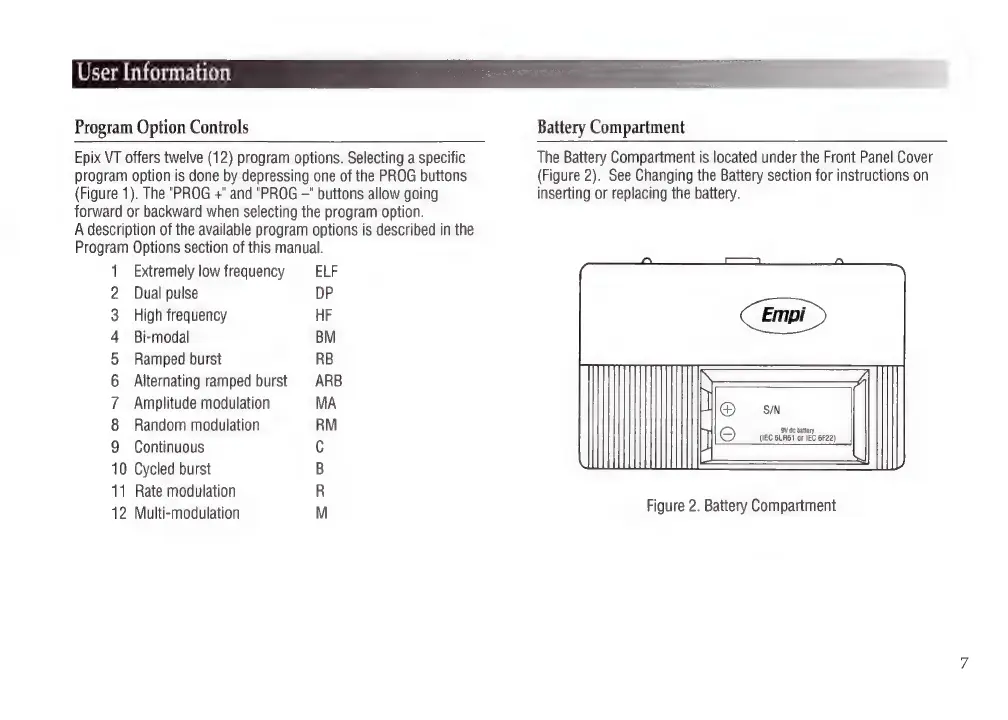
The
Battery
Compartment
is
located
under
the
Front
Panel
Cover
program
option
is
done
by
depressing
one
of
the
PROG
buttons
(Figure
2).
See
Changing
the
Battery
section
for
instructions
on
(Figure
1).
The
"PROG
+"
and
"PROG
—"
buttons
allow
going
inserting
or
replacing
the
battery.
forward
or
backward
when
selecting
the
program
option.
A
description
of
the
available
program
options
is
described
in
the
Program
Options
section
of
this
manual.
1
Extremely
low
frequency
ELF
2
Dual
pulse
DP
3
High
frequency
HF
4
Bi-modal
BM
5
Ramped
burst
RB
6
Alternating
ramped
burst
ARB
7
Amplitude
modulation
MA
8
Random
modulation
RM
jeans
(IEC
6LR61
or
IEC
6F22)
9
Continuous
C
10
Cycled
burst
B
11
Rate
modulation
R
12
Multi-modulation
M
Figure
2.
Battery
Compartment

Related product manuals