EasyManua.ls Logo

Empi EPIX VT - Page 19

Default Icon
32 pages
Print Icon
To Next Page IconTo Next Page
To Previous Page IconTo Previous Page
Loading...
User
Information
Initiating
Treatment
continued
STEP
4:
Turn
On
the
Device
Turn
on
the
Epix
VT
by
depressing
the
button
on
the
Pain
Scale
that
best
describes
your
current
level
of
pain.
Current
control
settings
will
be
displayed
on
the
Control
Panel.
STEP
5:
Select
the
Treatment
Settings
Your
clinician
has
recommended
one
of
the
program
options
explained
in
the
Stimulator
Controls
and
Features
section
of
this
manual.
Set
the
device
to
the
recommended
setting
if
different
from
the
one
shown
on
the
display.
Note:
To
avoid
a
startling
effect,
turn
the
TENS
device
off
before
adjusting
the
settings.
Note:
Consult
your
clinician
before
changing
the
recommended
settings.
STEP
6:
Connect
the
Lead
Wires
to
the
Device
Caution:
Always
turn
the
TENS
device
off
before
connecting
the
lead
wires
to
the
device.
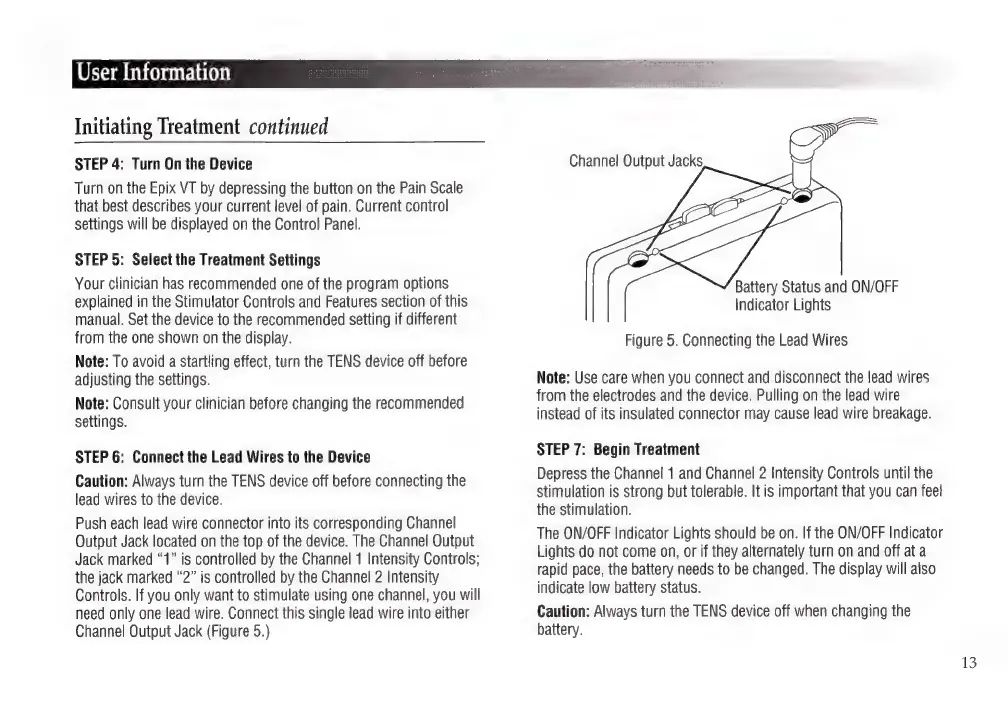
Push
each
lead
wire
connector
into
its
corresponding
Channel
Output
Jack
located
on
the
top
of
the
device.
The
Channel
Output
Jack
marked
ā€œ1ā€
is
controlled
by
the
Channel
1
Intensity
Controls;
the
jack
marked
ā€œ2ā€
is
controlled
by
the
Channel
2
Intensity
Controls.
If
you
only
want
to
stimulate
using
one
channel,
you
will
need
only
one
lead
wire.
Connect
this
single
lead
wire
into
either
Channel
Output
Jack
(Figure
5.)
Channel
Output
Jacks
Battery
Status
and
ON/OFF
Indicator
Lights
Figure
5.
Connecting
the
Lead
Wires
Note:
Use
care
when
you
connect
and
disconnect
the
lead
wires
from
the
electrodes
and
the
device.
Pulling
on
the
lead
wire
instead
of
its
insulated
connector
may
cause
lead
wire
breakage.
STEP
7:
Begin
Treatment
Depress
the
Channel
1
and
Channel
2
Intensity
Controls
until
the
stimulation
is
strong
but
tolerable.
It
is
important
that
you
can
feel
the
stimulation.
The
ON/OFF
Indicator
Lights
should
be
on.
If
the
ON/OFF
Indicator
Lights
do
not
come
on,
or
if
they
alternately
turn
on
and
off
ata
rapid
pace,
the
battery
needs
to
be
changed.
The
display
will
also
indicate
low
battery
status.
Caution:
Always
turn
the
TENS
device
off
when
changing
the
battery.
13

Related product manuals