EasyManua.ls Logo

Empi EPIX VT - Page 25

Default Icon
32 pages
Print Icon
To Next Page IconTo Next Page
To Previous Page IconTo Previous Page
Loading...
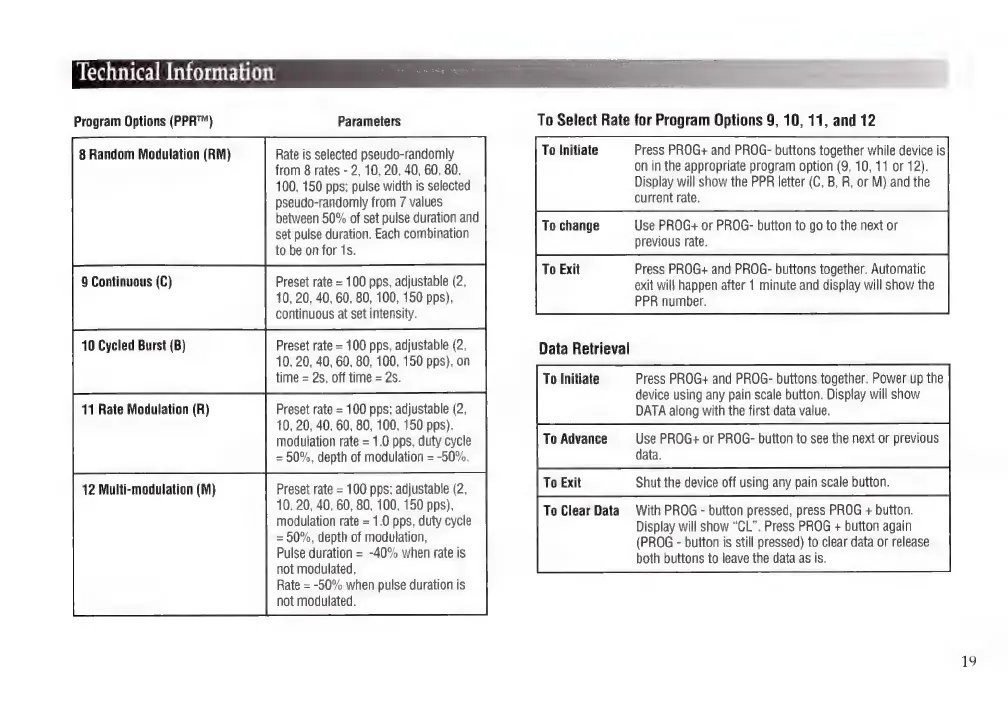
Technical
Information
Program
Options
(PPR™)
8
Random
Modulation
(RM)
9
Continuous
(C)
10
Cycled
Burst
(B)
11
Rate
Modulation
(R)
12
Multi-modulation
(M)
Parameters
Rate
is
selected
pseudo-randomly
from
8
rates
-
2,
10, 20,
40,
60, 80,
100,
150
pps;
pulse
width
is
selected
pseudo-randomly
from
7
values
between
50%
of
set
pulse
duration
and
set
pulse
duration.
Each
combination
to
be
on
for
1s.
Preset
rate
=
100
pps,
adjustable
(2,
10,
20,
40,
60, 80,
100,
150
pps),
continuous
at
set
intensity.
Preset
rate
=
100
pps,
adjustable
(2,
10,
20,
40, 60,
80,
100,
150
pps),
on
time
=
2s,
off
time
=
2s.
Preset
rate
=
100
pps;
adjustable
(2,
10,
20,
40, 60,
80,
100,
150
pps),
modulation
rate
=
1.0
pps,
duty
cycle
=
50%,
depth
of
modulation
=
-50%.
Preset
rate
=
100
pps;
adjustable
(2,
10,
20,
40, 60, 80,
100,
150
pps),
modulation
rate
=
1.0
pps,
duty
cycle
=
50%,
depth
of
modulation,
Pulse
duration
=
-40%
when
rate
is
not
modulated,
Rate
=
-50%
when
pulse
duration
is
not
modulated.
To
Select
Rate
for
Program
Options
9,
10,
11,
and
12
To
Initiate
Press
PROG+
and
PROG-
buttons
together
while
device
is
on
in
the
appropriate
program
option
(9,
10,
11
or
12).
Display
will
show
the
PPR
letter
(C,
B,
R,
or
M)
and
the
current
rate.
To
change
Use
PROG+
or
PROG-
button
to
go
to
the
next
or
previous
rate.
To
Exit
Press
PROG+
and
PROG-
buttons
together.
Automatic
exit
will
happen
after
1
minute
and
display
will
show
the
PPR
number.
Data
Retrieval
To
Initiate
Press
PROG+
and
PROG-
buttons
together.
Power
up
the
device
using
any
pain
scale
button.
Display
will
show
DATA
along
with
the
first
data
value.
To
Advance
Use
PROG+
or
PROG-
button
to
see
the
next
or
previous
data.
To
Exit
Shut
the
device
off
using
any
pain
scale
button.
To
Clear
Data With
PROG
-
button
pressed,
press
PROG
+
button.
Display
will
show
“CL”.
Press
PROG
+
button
again
(PROG
-
button
is
still
pressed)
to
clear
data
or
release
both
buttons
to
leave
the
data
as
is.
19

Related product manuals