10
7.0 | Unit Description
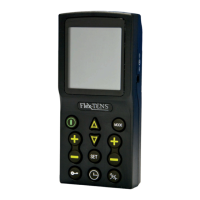
ON/OFF Button: Turns the unit ON and OFF.
Amplitude Controls: Controls the “INTENSITY” level of stimulating pulses.
TENS/IF Button: Selects the mode of treatment. (TENS or INTERFERENTIAL)
MODE Button: (ONLY in TENS mode) Choose the TENS stimulation modes: Burst, Normal,
Modulated rate and width (MRW), Alternating modulated intensity and pulse width (SD) and Bi-Pulse
SET Button: Sets the pulse width, pulse rate. (in TENS Mode) Treatment function, pulse rate.
(in INTERFERENTIAL mode)
TIM
ER Button: Sets the timer.
INCREASE & DECREASE Button: Increase and decrease pulse width, pulse rate, and choose the
the INTERFERENTIAL mode.
LOCK/UNLOCK Button: Locks or unlocks the unit.
and pulse rate in


 To Next Page