EasyManua.ls Logo

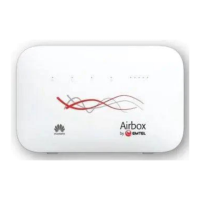
Emtel Airbox - User Manual

Default Icon
8 pages
Print Icon
To Next Page IconTo Next Page
Loading...
Your LTE User Guide
Powered by Emtel
PLUG & PLAYUNLIMITED
ISLAND WIDE COVERAGE
by
Airbox
Question and Answer IconNeed help?

Do you have a question about the Emtel Airbox and is the answer not in the manual?

Summary

Getting Started

Precautionary Steps for Modem Usage

Provides essential advice for optimal modem placement, security, and protection against environmental hazards.

Understanding Your Router

Status Indicators

Covers Wi-Fi/WPS, LAN/WAN, and signal strength indicators for monitoring device status.

Control Buttons

Details the WPS, Power, and Reset buttons for controlling the router's functions.

Connectivity Ports

Explains the various ports including SIM, antenna, power, LAN, USB, and telephone for connectivity.

Troubleshooting LTE Connectivity

Power and Cable Checks

Ensures proper power adapter connection and cable seating for stable connectivity.

Wi-Fi;LAN Connection Verification

Checks SSID and authentication for Wi-Fi or LAN connections to resolve issues.

Router Reset Procedures

Guides on performing hard reset or soft power cycle to troubleshoot connectivity problems.

Important Facts and Tips

Modem Placement and Signal Integrity

Guidance on positioning the modem for optimal Wi-Fi coverage and avoiding interference from household elements.

Usage Recommendations and Security

Advice on managing multiple users, protecting Wi-Fi passwords, and handling the SIM card during operation.

Environmental Protection and Power Safety

Precautions against environmental factors like moisture, heat, and thunderstorms, plus safe power connection advice.

Network Indicators and Accessories

Information on interpreting network status lights and the optional external antenna.

Summary

Getting Started

Precautionary Steps for Modem Usage

Provides essential advice for optimal modem placement, security, and protection against environmental hazards.

Understanding Your Router

Status Indicators

Covers Wi-Fi/WPS, LAN/WAN, and signal strength indicators for monitoring device status.

Control Buttons

Details the WPS, Power, and Reset buttons for controlling the router's functions.

Connectivity Ports

Explains the various ports including SIM, antenna, power, LAN, USB, and telephone for connectivity.

Troubleshooting LTE Connectivity

Power and Cable Checks

Ensures proper power adapter connection and cable seating for stable connectivity.

Wi-Fi;LAN Connection Verification

Checks SSID and authentication for Wi-Fi or LAN connections to resolve issues.

Router Reset Procedures

Guides on performing hard reset or soft power cycle to troubleshoot connectivity problems.

Important Facts and Tips

Modem Placement and Signal Integrity

Guidance on positioning the modem for optimal Wi-Fi coverage and avoiding interference from household elements.

Usage Recommendations and Security

Advice on managing multiple users, protecting Wi-Fi passwords, and handling the SIM card during operation.

Environmental Protection and Power Safety

Precautions against environmental factors like moisture, heat, and thunderstorms, plus safe power connection advice.

Network Indicators and Accessories

Information on interpreting network status lights and the optional external antenna.

Emtel Airbox Specifications

General IconGeneral
BrandEmtel
ModelAirbox
CategoryModem
LanguageEnglish

Related product manuals