1. Getting Started
2. Getting to know my Router
My Precautionary steps:
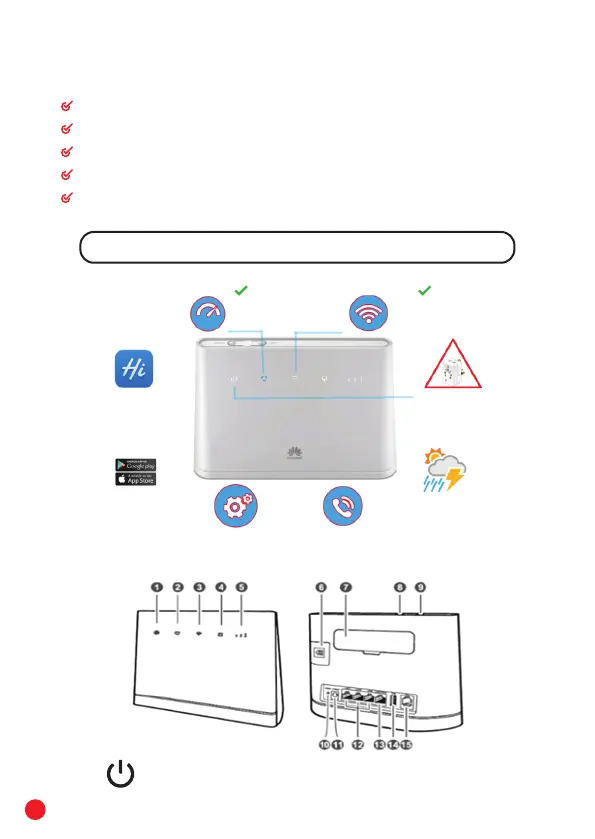
Place the modem on a high shelf to increase WI- FI coverage
Set the WI- FI password and do not share until same is allowed by you.
No use of Multi-plug and keep away from rain & sunlight.
Remove power adapter from power outlet during thunder storms
Download Huawei HiLink from Playstore/Appstore to monitor my usage
If power remain off: Follow steps 9-10 & also avoid use of multi-plug.
Connect power supply to AC outlet.
Power Indicator
4
Download Huawei HiLink
from Playstore/Appstore.
Monitor your internet
usage, check your package
and send/ receive sms
through your Airbox.
Avoid use of multi-plugs,
keep away from rain &
sunlight. Remove power
adapter from power outlet
during thunderstorms
Wi-Fi password confidential
Cyan color indicates Optimum
4G Network coverage
Place modem on a high shelf to increase Wi-Fi coverage



 To Next Page