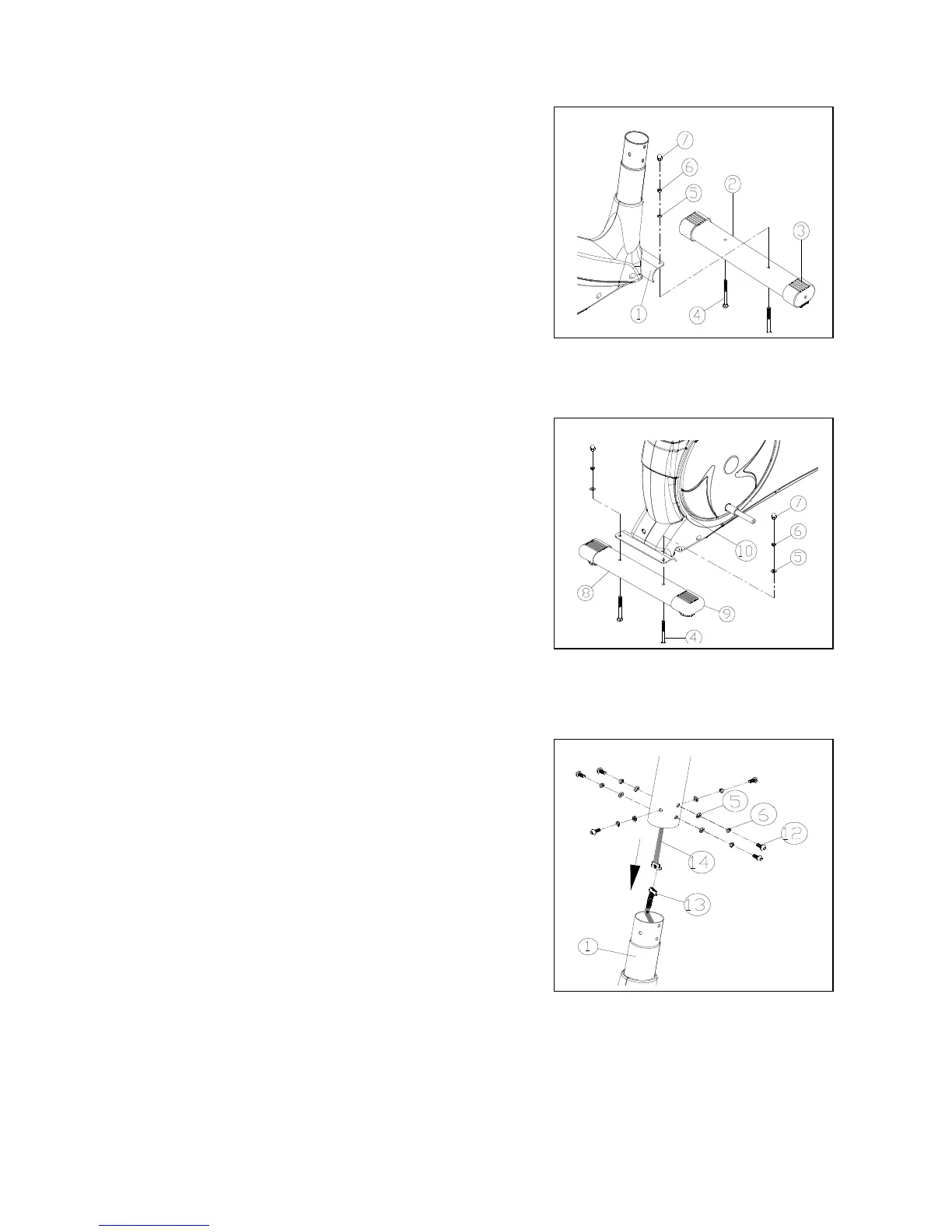
STEP 1
Installation of the Front Stabilizer (2) to the Base (1) .
Using :
2 - M8 x 52mm Carriage Bolt (4)
2 - M8 Washer (5)
2 - M8 Spring Washer (6)
2 – M8 Cap Nut (7)
STEP 2
Installation of the Rear Stabilizer (8) to the Base (1) .
Using :
2 - M8 x 52mm Carriage Bolt (4)
2 - M8 Washer (5)
2 - M8 Spring Washer (6)
2 - M8 Cap Nut (7)
STEP 3
Connecting the Computer (13+14) and installation
of Handle Bar Post (15).
Connect the two ends of the Computer Upper Cable (14)
and Lower Cable (13). A click can be felt when pushing
the two parts together. Insert the Handlebar Post (15)
into the base.
Using :
6 - M8 x 15mm Allen Head Screw (12)
6 - M8 Spring Washer (6)
6 - M8 Washer (5)





 To Next Page