Geמּing Started
BEFORE YOU START: See “Safety Information” section for important precautions. Please conform to all safety precautions in the guide when using solar panels. Before using a solar photovoltaic system (including cable,
power station or other electric equipment), the user should be familiar with the mechanical and electrical requirements for photovoltaic systems. Keep this guide in a safe place for future reference.
NOTE: The steps below show the basic sequence to charge your PowerSource. You may also keep your Portable Solar Panel connected to your PowerSource while the generator is being used to charge and operate your
household items. Solar input power will offset the discharge power (See “Optimizing Your Solar Charging” on the next page).
Operation and Use - Connecting To Your PowerSource
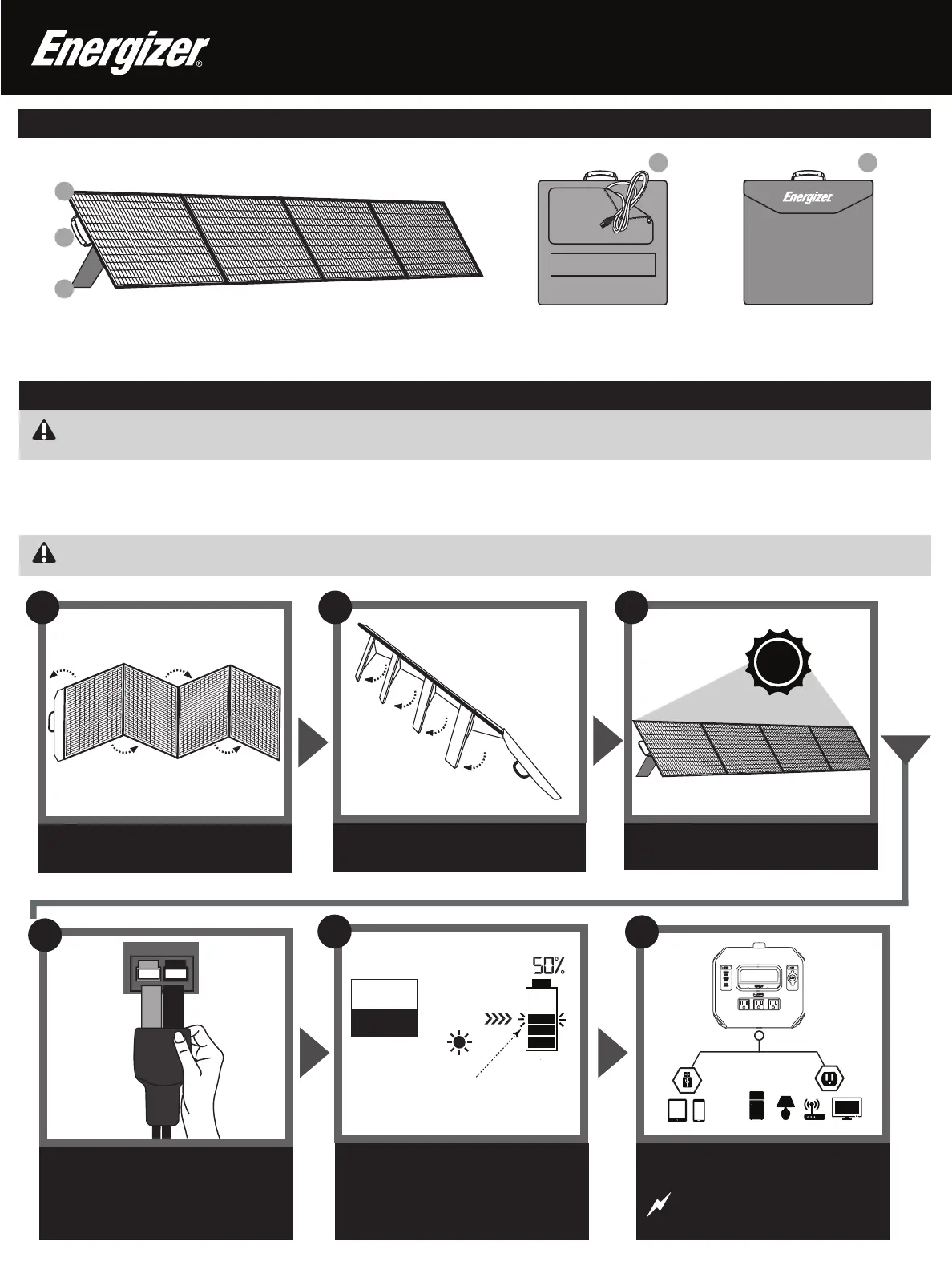
Unfold the legs.
Unfold the solar panel.
1
The Portable Solar Panel converts solar energy to DC current for charging PowerSources that run popular household items and electronics. The solar panel connects directly to your PowerSource for simple, plug-and-play ease of use (also
connects to additional rechargeable products that use an Anderson Powerpole 15/45 connector for recharging the internal baמּery).
2
Position solar panel for maximum
sun exposure.
A. Portable folding solar panel
B. Carry handle
C. Folding legs
Align the colors and connect the solar
panel to your PowerSource.
Plug in and power household items
from your charged PowerSource.
6
NEED MORE POWER?
Please see “Connecting AdditIonal
Solar Panels” on next page.
SOLAR INPUT
RED
RED
4
User Guide - 200 Watt
Portable Solar Panel
Product Details
3
AC/UPS
USB
12V
DISPLAY
12W
12W
100W
A
B
C
D E
Geמּing Started
5
The PowerSource’s intelligent LCD
screen will show the solar icon, the input
power and the baמּery charge level.
TIME
TO FULL
WATTS
Baמּery fuel gauge bars will flash
as the charge level increases
400
4:00
D. Power cable (aמּached to solar panel)
E. Protective front closure flap
U LTI M AT E




 To Next Page