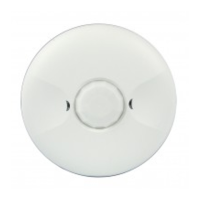
MPC-50H-L1: Mounting height: 50ft Field of view: 360° Coverage :2800 sq.ft
Adjustable Light Level..................................................10FC—150FC
@ 120VAC, .............................................................0-800W ballast or tungsten
DESCRIPTION
MPC-50H
SPECIFICATIONS
Voltage ...........................................................120/277VAC, 50/60Hz
Load Requirements:
@ 277VAC, ..............................................................................0-1200W ballast
@ 120VAC ...............................................................................................1/4 hp
Sensitivity Adjustable.................................50% or 100%(DIP switch)
Coverage:
Operating Temperature ................................32°to 131°F (0°to 55°C)
Relative Humidity .......................................20-90%, non-condensing
Material........................................................................................ABS
-LED indicator of occupancy detection for easy verification of coverage
-Easy front access to time delay, sensitivity range and ambient light
-Hardware choices for side and back mount
-Compatible with all program start ballasts
-Zero crossing circuitry reduces stress on relay and extends sensor life
The MPC-50H occupancy sensor is designed for automatic lighting
control in high bay applications,such as warehouses,distribution cen-
-ters, gymnasiums, and areas with direct access to the lighting fixtures,
sensor (PIR) .
MPC-50H-L2: Mounting height: 8ft Field of view: 360° Coverage :1200 sq.ft
FEATURES
DESCRIPTION
WARNING: Turn the power off at the circuit breaker before
The MPC-50H-L1 coverage pattern
Lens choice:
The coverage area is determined by the type of lens attached to the
MPC-50H. (See Figure 1).
The MPC-50H-L2 coverage pattern
Figure 1
installing the sensor
1.Determine the mounting location appropriate to the sensor and the
coverage area. Careful consideration must be given to sensor where
the edge of the fixture, shelving or other obstructions may block the
sensor’s line of sight . Mount the sensor below the edge of the fixture
and away from the fluorescent lamps so that the heat from the lamps
does not affect the sensor.
2.Make sure that you have the appropriate accessories for the sensor
COVERAGE
INSTALLATION
MPC-50H-L1
Sensor including
backbox and lens
MPC-50H-L2
Sensor including
backbox and lens
0.65"
0.69"
2.60"
0.65"0.70"
2.61"
Turn the potentiometer on the sensor to the "-”, if adequate ambient
light,the output of sensor will be inhibited, and the load can not be on;
only when the ambient light is down to a certain level the sensor will auto-
1 .Avoid mounting the sensor close to heat source.
2 .Adjust during daylight hours when ambient light in
the area reach the desired level. Open the Front
Cover and adjust the Light level.
mounting configuration. (See Mounting Options.)
3.Connect the line voltage and load wires to the sensor leads as shown
in the Wiring Diagram
Do not allow bare wire to show.
Make sure all connections are secure.
4.Attach the MPC-50H as shown in the assembly drawing on the next
page.
5.Restore power from the circuit breaker.
Refer to the wire diagram of the sensor (See Figure 2)
1.Connect the hot wire to the black wire from the sensor
2.Connect the neutral wire to the white wire from the sensor
3.Connect the load wire to the red wire from the sensor
Figure 2
-matically turn on.Therefore,potentiometers require customers to adjust
in accordance with the location and the ambient light level.
Turn the potentiometer on the sensor
ambient light level.The load will be as long
occupancy.
WIRING
LIGHT LEVEL ADJUSTMENT
INSTALLATION INSTRUCTIONS
-01- -02- -03-
-Easy mounting using 1/2'' knockout at end of luminaire fixture
specifically for indoor locations.This product contains a passive infrared
level adjustment
High Bay 360° Passive Infrared Line Voltage
Occupancy Sensor
Neutral
Hot
Load
MPC-50H
Black
Red
White
Figure 2
LOW VIEW
HIGH VIEW
20ft 10ft 0ft 10ft 20ft
15
22ft 13ft 7ft 3ft 0 3ft 7ft 13ft 22ft .
8 ft
Typical
desk-top
level
44 ft
13.4 m
50 ft
30ft 20ft 10ft 0 10ft 20ft 30ft
to the "+”, regardless of the
as there are signals from

 Need help?
 General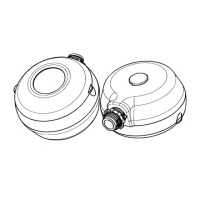

 To Next Page