64
5. BASIC OPERATION
5.1. Program Manage Settings
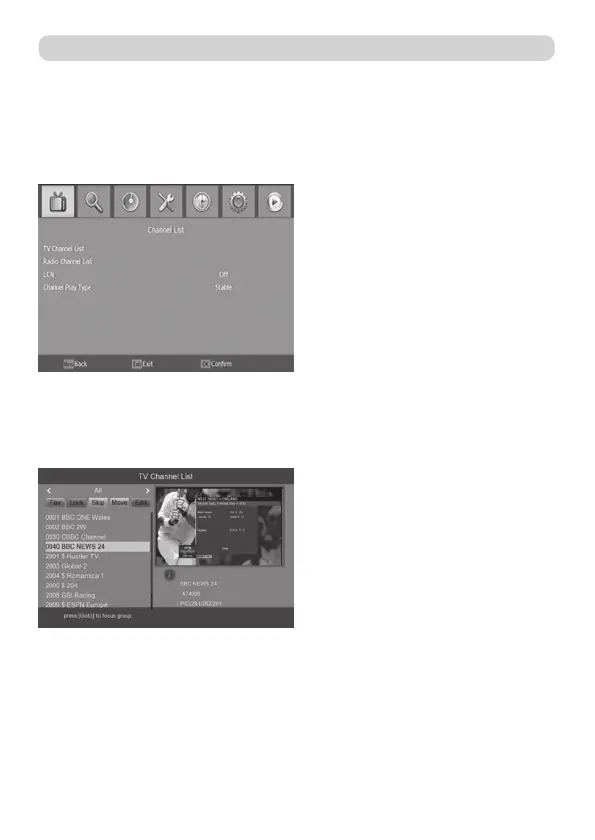
To access the menu, press the MENU button and select ”Program”. Using the RIGHT/LEFT
keys to navigate through the menu. The menu provides options to adjust the program ma-
nage settings. Select an option and press OK or RIGHT to adjust that setting. Press the
EXIT button to exit the menu.
5.1.1. Program Edit
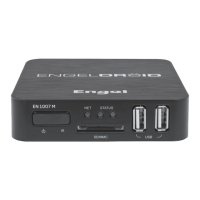
To edit your program preferences (fav, lock, skip, move, sort, rename or delete), you will
need to enter the program edit menu.
1- FAV > You can create a shortlist of favourite programs that you can easily access.
2- LOCK > You can lock selected programs for restricted viewing.
3- SKIP > Skip TV or radio channe.
4- MOVE > Move a TV or radio program.
5- SORT > Sort your channels from the following option
6- RENAME > Rename the program names.
7- DELETE > When the TV or Radio Channel List window displays, press the Blue key to
enter the Edit mode. Then, press the Blue key to delete the channels.


 To Next Page