EUB9801 – 300Mbps 802.11 a/b/g/n Dual Band Wireless N USB Adapter
22
Network (Site Survey)
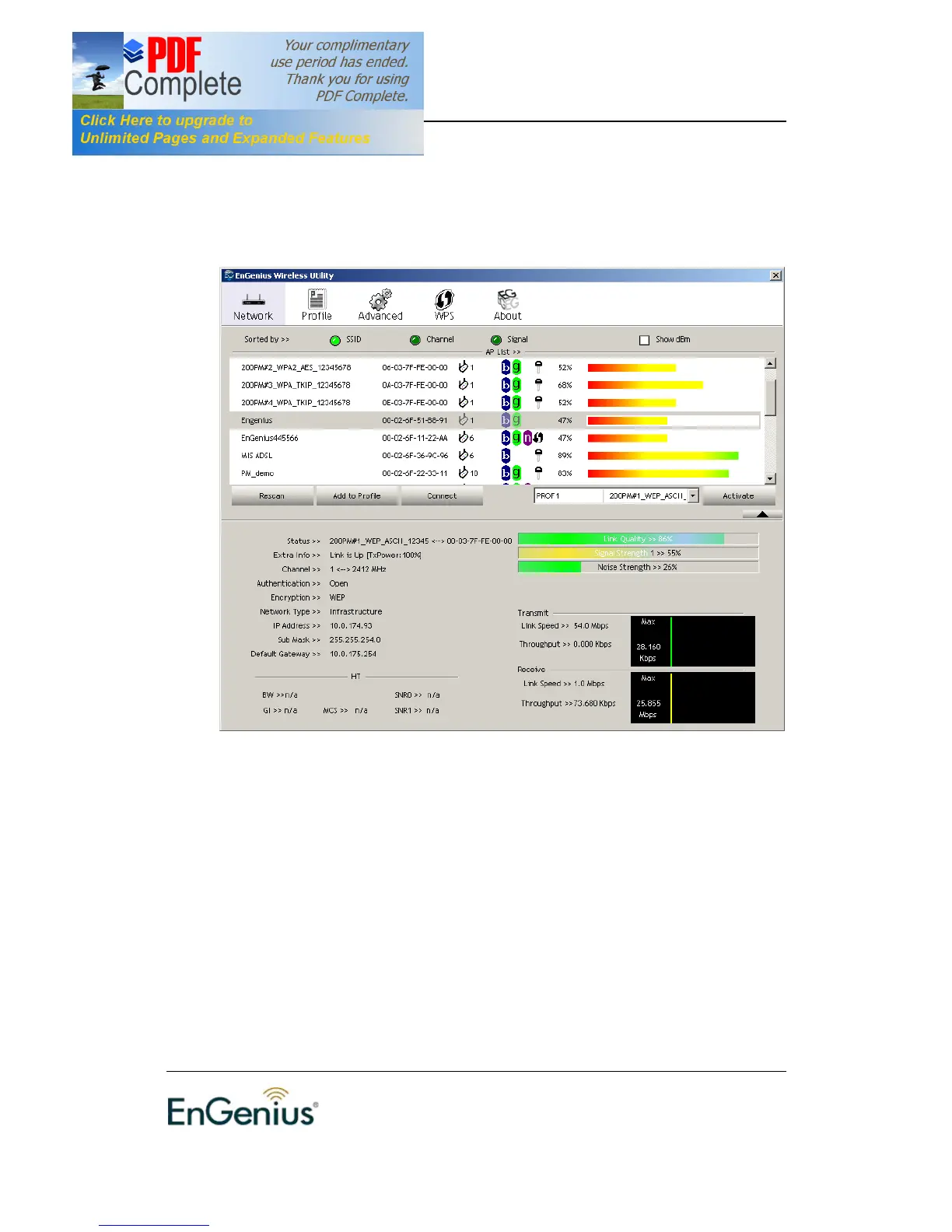
The Network tab displays a list of Access Points and Stations in the area, and
allows you to connect to a specific one. The following information is included in
this tab, as the image depicts below.
The information is displayed in the following order: SSID, MAC, Channel,
Mode, Security, and Signal.
† SSID: Displays the SSID of the Access Point. The SSID is a unique
name shared among all points in your wireless network. The SSID must
be identical for all points in the network, and is case-sensitive.
† MAC: AP MAC address
† Channel: Displays the channel number of the Access Point.
† Mode: Displays the supporting AP mode.
† Signal: Displays the receiving signal strength from the Access Point.
† Rescan: Click on this button to view a list of Access Points in the area.
† Add to Profile: Click on this button to add the SSID and its associated
settings into a profile.
† Connect: to connect with a specific Access Point, select the SSID from
the list, and then click on the Connect button.
† Activate: set this AP as default AP.


 To Next Page