EUB9801 – 300Mbps 802.11 a/b/g/n Dual Band Wireless N USB Adapter
33
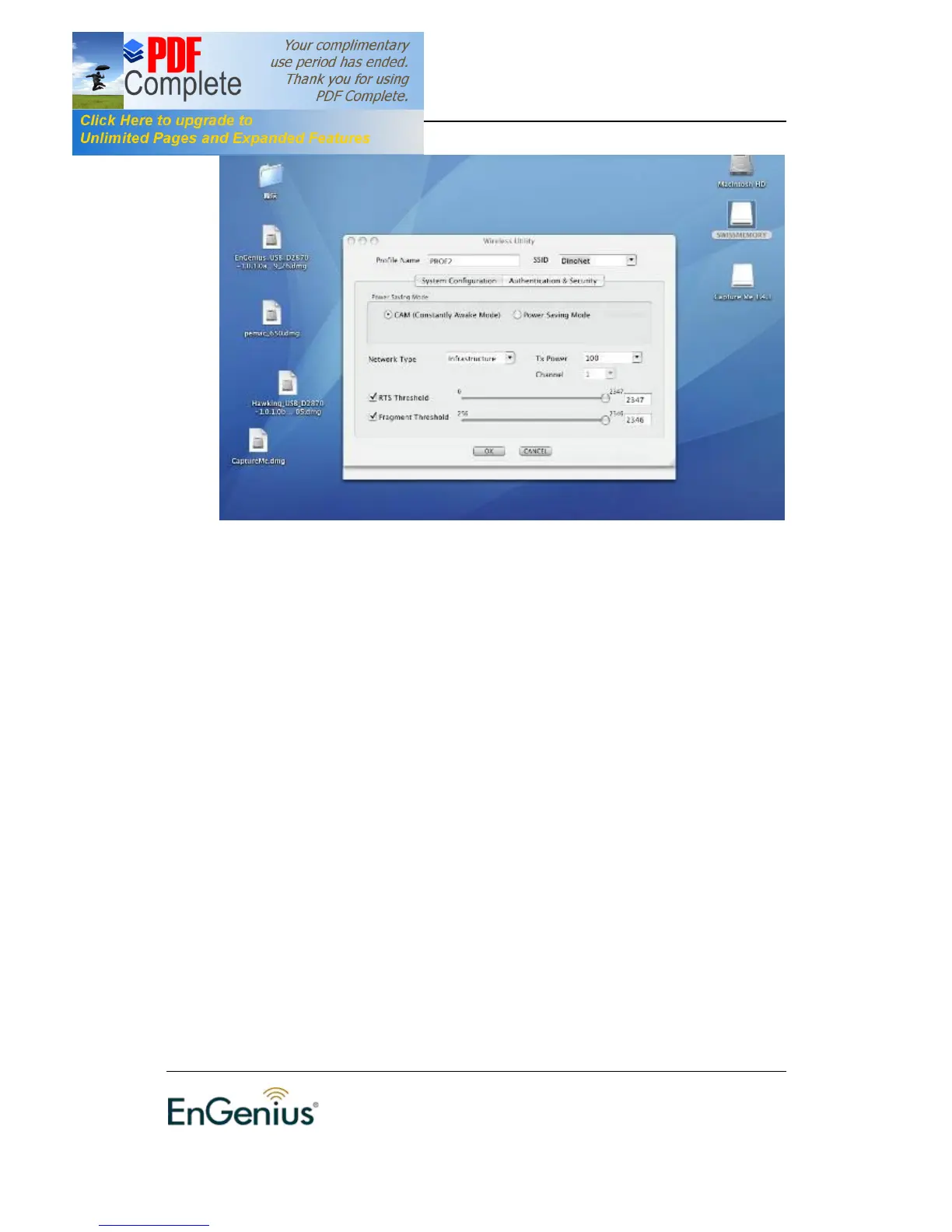
† Profile: Enter a name for the profile; this does not need to be the same
as the SSID.
† SSID: Enter the SSID of the network or select one from the drop-down
list. The SSID is a unique name shared among all points in your wireless
network. The SSID must be identical for all points in the network, and is
case-sensitive.
† PSM: Select a power saving mode (PSM) option.
o CAM (Continuously Active Mode): Select this option if your
notebook is always connected to the power supply.
o PSM (Power Saving Mode): Select this option if your notebook
uses its battery power. This option minimizes the battery usage
while the network is idle.
† Network Type: Select Infrastructure from the drop-down list.
† TX Power: Select a transmit power from the drop-down list. If your
notebook is connected to external power then select 100% or auto, if
not, select one of the lower values for power saving.
† RTS Threshold: Place a check in this box if you would like to enable
RTS Threshold.
Any packet larger than the specified value (bytes) will send
RTS/CTS handshake packet.
† Fragment Threshold: Place a check in this box if you would like to
enable Fragment Threshold. Any packet larger than the specified value
(bytes) will be fragmented.
† Click on the OK button to save the changes.


 To Next Page