POW ER ON/OFF
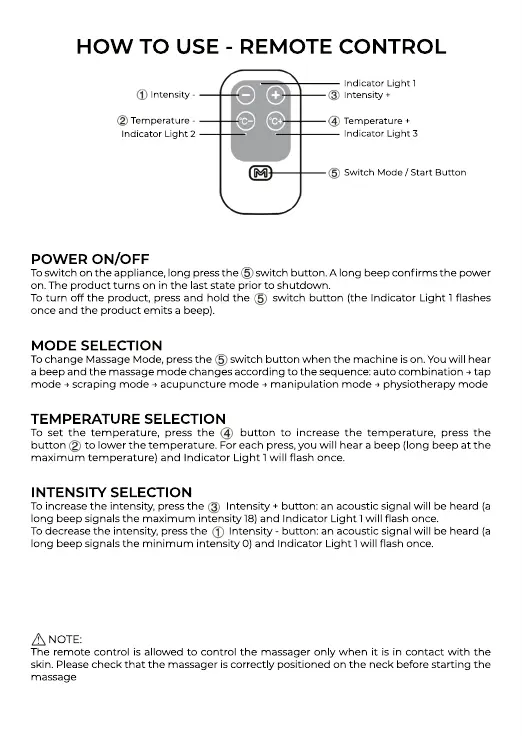
To switch on the appliance, long press the switch button. A long beep confirms the power
on. The product turns on in the last state prior to shutdown.
To turn off the product, press and hold the switch button (the Indicator Light 1 flashes
once and the product emits a beep).
MODE SELECTION
TTo change Massage Mode, press the switch button when the machine is on. You will hear
a beep and the massage mode changes according to the sequence: auto combination → tap
mode → scraping mode → acupuncture mode → manipulation mode → physiotherapy mode
TEMPERATURE SELECTION
To set the temperature, press the button to increase the temperature, press the
button to lower the temperature. For each press, you will hear a beep (long beep at the
maximum temperature) and Indicator Light 1 will flash once.
INTENSIINTENSITY SELECTION
To increase the intensity, press the Intensity + button: an acoustic signal will be heard (a
long beep signals the maximum intensity 18) and Indicator Light 1 will flash once.
To decrease the intensity, press the Intensity - button: an acoustic signal will be heard (a
long beep signals the minimum intensity 0) and Indicator Light 1 will flash once.
NOTE:
TThe remote control is allowed to control the massager only when it is in contact with the
skin. Please check that the massager is correctly positioned on the neck before starting the
massage
HOW TO USE - REMOTE CONTROL
Intensity -
Temperature -
Indicator Light 2
Indicator Light 1
Intensity +
Temperature +
Indicator Light 3
Switch Mode / Start Button


 To Next Page
 Loading...