A
C
D
B
F E
G
H
J
M
LI K
N
O
P
2 CR825 Instant Issuance System User Reference Guide 527751-001EN_C
Contents The CR825 Instant Issuance System
527751-001EN_C CR825 Instant Issuance System User Reference Guide 3
English
English
Contents
The CR825 Instant Issuance System .....................................................3
The CR825 Printer with Oponal Mul-Hopper ...................................4
Load Cards in a Single-Hopper Printer ..................................................5
Use the Excepon Slot ......................................................................... 6
Load Cards in a Mul-Hopper Printer ...................................................7
Use the Mul-Hopper Excepon Slide .................................................8
Clean the Printhead Cam Rollers ..........................................................9
Clean the Printer ............................................................................... 11
Replace the Color Ink Ribbon ............................................................. 13
Replace the Cleaning Sleeve .............................................................. 15
Replace the Retransfer Film ............................................................... 17
Empty the Reject Tray ........................................................................ 19
Clear a K1 Horizontal Transport Card Jam .......................................... 20
Clear a K2 Vercal Transport Card Jam ............................................... 21
Clear a Flipper Card Jam .................................................................... 22
Repair a Broken Ink Ribbon ............................................................... 23
Repair Broken Retransfer Film ........................................................... 24
Check the Power Connecon ............................................................. 25
Check the Data Connecon ................................................................ 26
Common LCD Messages ..................................................................... 27
Warning: This product contains chemicals, including lead, known to the
State of California to cause cancer, and birth defects or other reproducve
harm. Wash hands aer handling.
For more informaon on this warning, refer to the following:
www.datacard.com/califpropwarning.
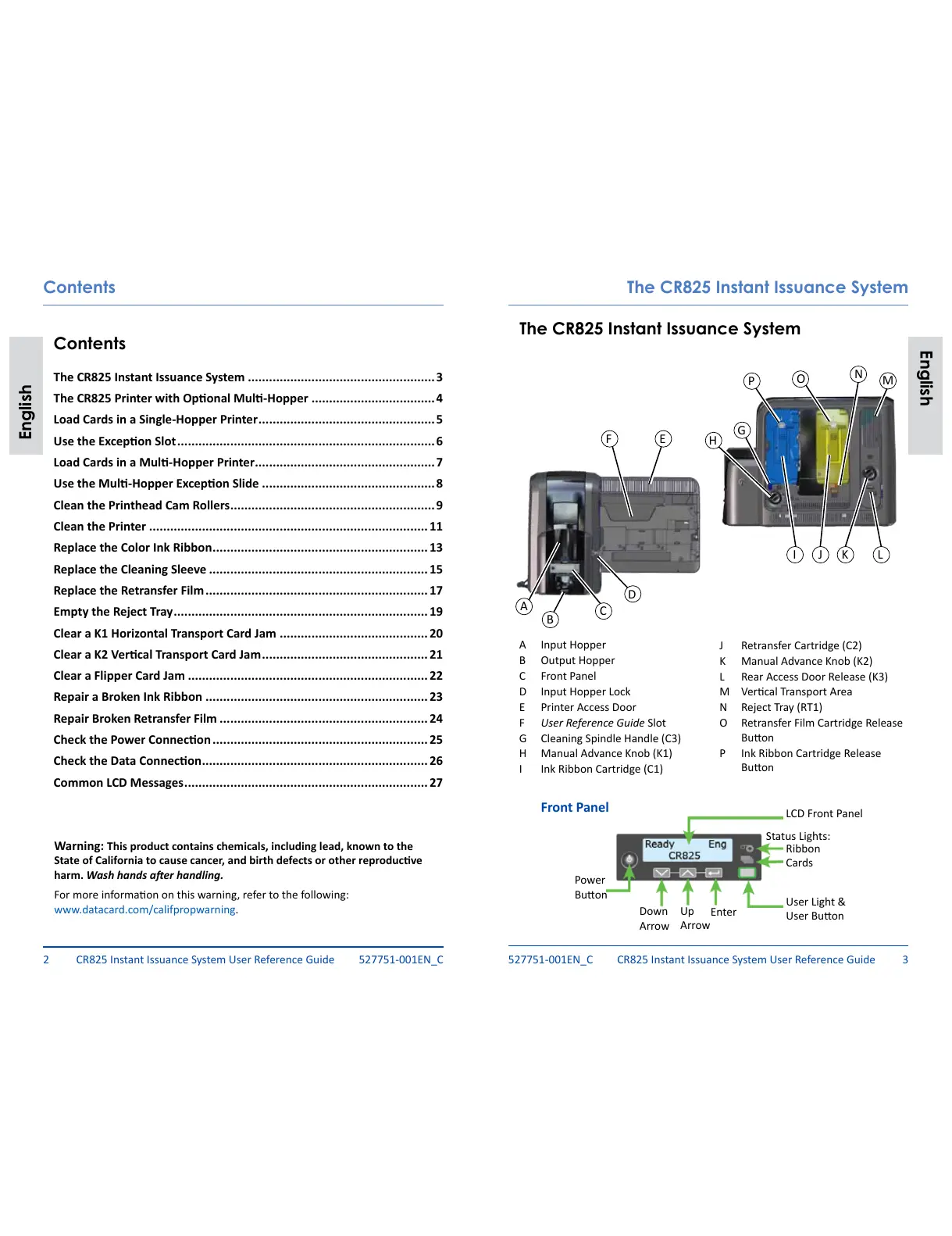
A Input Hopper
B Output Hopper
C Front Panel
D Input Hopper Lock
E Printer Access Door
F User Reference Guide Slot
G Cleaning Spindle Handle (C3)
H Manual Advance Knob (K1)
I Ink Ribbon Cartridge (C1)
J Retransfer Cartridge (C2)
K Manual Advance Knob (K2)
L Rear Access Door Release (K3)
M Vercal Transport Area
N Reject Tray (RT1)
O Retransfer Film Cartridge Release
Buon
P Ink Ribbon Cartridge Release
Buon
LCD Front Panel
User Light &
User Buon
Up
Arrow
Enter
Status Lights:
Down
Arrow
Power
Buon
Ribbon
Cards
Front Panel
The CR825 Instant Issuance System



 To Next Page