4. Using the nShield Trusted Verification
Device
Item Description
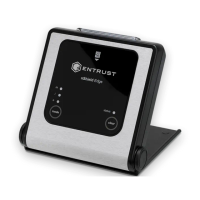
A: Card slot For inserting a smart card into the TVD, the chip on the card should
face the user and inserted first into the card slot.
B: Display Displays the ESNÊof the HSM.
C: Keypad •
0-9, CLR, ˄ and ˅: Not used
•
C: Used for canceling the current smart card verification
•
@: Can be used to show the firmware version and the name of the
reader (status LED flashes at the same time)
Note: Do not press the @ key when there is a smart card in the
card slot because the time taken to display this information can
cause the secure connection between smart card and HSM to be
broken.
•
OK: Used to confirm the smart card verification and abort
messages
D: Status LED The status LED will flash when the TVD:
•
Is connected to a USBÊport
•
Requires the user to confirm a decision. For example, if the C
button is pressed during a smart card verification the LED will
flash and you will be asked to confirm the abort by pressing OK.
nShield® Trusted Verification Device Installation Guide 7 of 9


 To Next Page