11
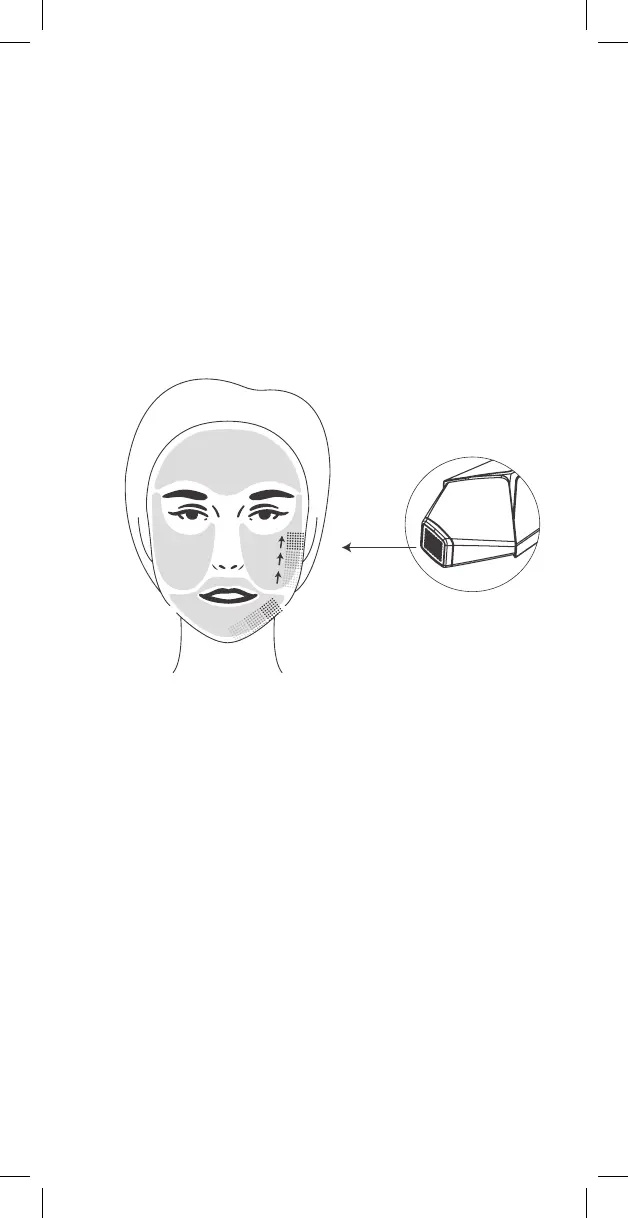
FIG.10
7. Place the Edge's treatment head at and in full contact against your skin
and then press the Trigger Button to emit energy. During the energy
pulse, the headlight will briey turn blue, accompanied by a vibration
sensation. At the end of the pulse, the device will beep.
8. After the beep you can move to the adjacent location.
9. Proceed with this technique covering the entire treatment area, use
methodological pattern to ensure the entire face is covered (Fig.10).
There is no need to treat the same area more than once.
Note: you may use dierent power settings on dierent parts of your face
depending on the sensitivity of the treatment area. Such as perioral or
periorbital (around the mouth and the eyes).
10. The treatment is complete once you covered the entire face.
11. Press the Power Button for two seconds to turn the device OFF.
12. Clean the device treatment head with alcohol wipes and cover the device
with its protective cover.
NOTES:
• You can easily change the power setting by pressing on the Power Button
throughout the treatment.
• The skin may show some redness (erythema) and minor skin swelling
(edema) in the treatment area. Both should disappear after a short time.
• You may feel tingling sensation while and after using the device.



 To Next Page