Page 9 Envoy Connect User Guide
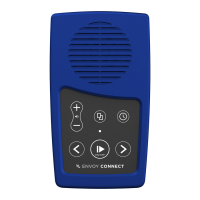
To Delete a Book: Press and hold the Bookshelf and
Volume Up buttons together for 5 seconds. You will
hear a single beep each second, followed by a final
series of beeps in quick succession to confirm the
deletion. Keep holding the buttons down until the
series of quick final beeps has ended.
Note: If you release the buttons before the final
confirmation beeps the book will not be deleted.
- Turn Off Sleep Timer: Press and hold the Sleep
Timer button for 2 seconds until you hear the
confirmation chime.
- Auto Power Off: If playback is paused for more than
2 minutes, the Player will turn itself off. This avoids
the need to turn off the player manually. Note that the
Player will remember your last reading position.
- Battery Status Indicator: When the player is in
Pause mode, you can press and hold the Back button
to hear beeps that indicate battery level. If the player
emits 1 beep, the battery level is low and should be
recharged. If the player emits 2 beeps, the battery is
at medium level and you can continue to use the
Player. If the player emits 3 beeps, the battery is fully
charged (over 75%).
- Low Battery Warning: The Player will emit a ‘Low
Battery’ warning chime when battery capacity drops
below 30%. It is important to charge the player at this
point. The Player will continue to chime every minute


 To Next Page
 Loading...