5
● :Fast farward (only available under DVD/CARD/USB mode)
● :Fast backward (only available under DVD/CARD/USB mode)
● :Next track (only available under DVD/CARD/USB mode)
● :Previous track (only available under DVD/CARD/USB mode)
● :Stop (only available under DVD/CARD/USB mode)
● :Play/Pause (only available under DVD/CARD/USB mode)
● :MP3/images broadcast
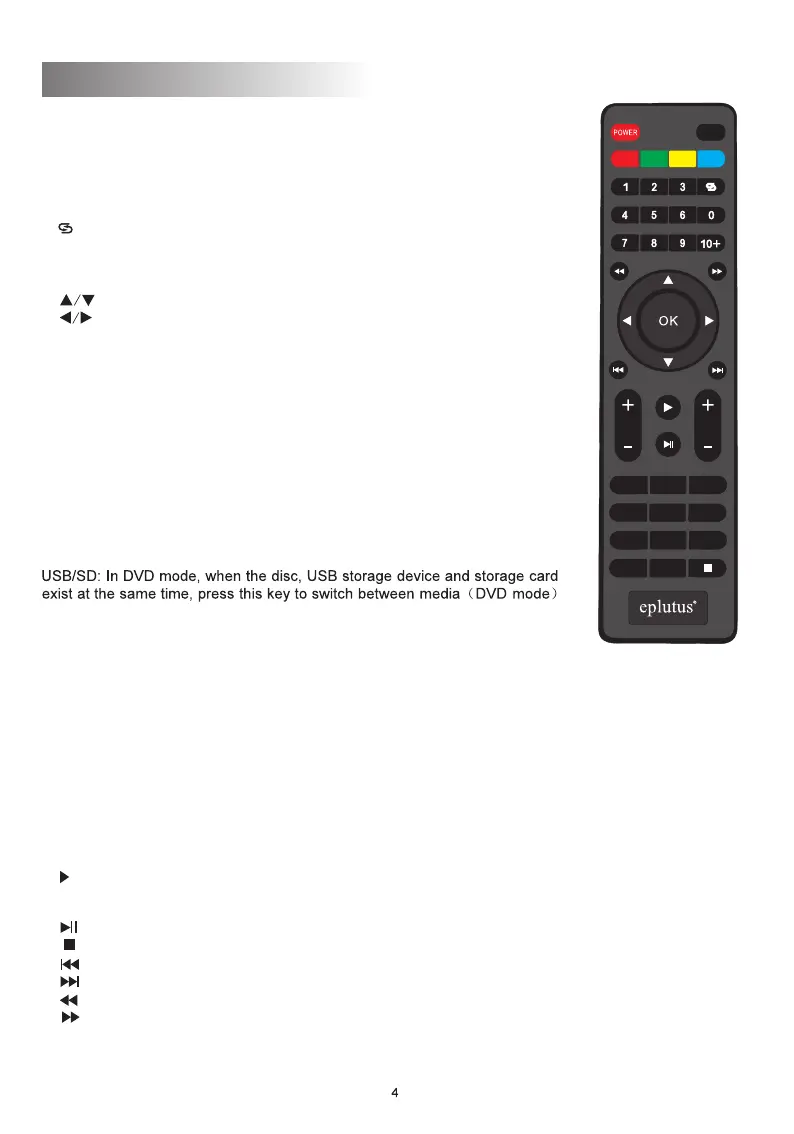
Remote Controller
● Power (Power Switching Key): When you press this key, the
TV set will be turned off, and press again it will be turned on.
● MUTE:When you press this key, the sound will disappear,
again press the sound will return to normal
● Channel Key (Number key (0-9) ):
In TV mode ,press relevant key directly when you want to change channel
In DVD mode,press to select or program.
● : Return Key. Press this key to return to previous channel you
were watching and press again to return to current channel.
● INFO: When you press this key, the system will show the message
/information of present program.
● : up and down direction key
● : left and right direction key
● CH+/CH- (Program choosing key):
Press CH+ key to increase the channel.
Press CH- key to decrease the channel.
● EXIT: Exit Key. Press this key, exit operation and return to the
program.
● AUDIO: Audio language button.
● EPG: When you press this key, the system will show the program
guide menu(DTV mode).
● ‘‘RED key’’: Corresponding menu red function key(DTV mode).
● VOL+/VOL- (Volume control key):
Press VOL+ to turn up the volume.
Press VOL- to turn down the volume.
● MENU/P.ADJ: DVB menu to select mode, long press for
3 seconds to enter the image adjustment; AV mode image adjustments
● ‘‘GREEN’’ key: Corresponding menu green function key(DVD mode).
SETUP: Press this key to adjust the brightness, contrast,, hue,
saturation. Sharpness. Horizontal, Vertical and image scale, turn off
display and reset. Use together with Left/Right key(DVD mode).
● ‘‘YELLOW’’ key: Corresponding menu yellow function key.(Under DTV
mode,press this key to switch aspect ratio)
REP: In the CHAPTER, the TITLE, REP ALL pattern choice
● ‘‘BLUE’’ key: Corresponding menu blue function key(Under DTV mode,press the key for
timing burn function).
SEARCH: Press to select chapter/title or time point to play.
● 10: DVD mode, select 10 more music or images.+
● TEXT: Turn teletext function.
Note: Use the remote controller within 5m from the player and
keep an angle smaller than 60 with the receiving window.
● TV/RADIO: TV channel and radio channel switch key.
●SUBTITLE: Press to turn ON/OFF subtitles.
●OK: Confirm key.
●MODE: Operation mode shift button DVD/TV/AV.
● FAV: Faorite list
●Program:Program setting(DVD mode).
CH
TV/RADIO
MENU
EXIT
MODE
INFO
EPG
TEXT
SUBTITLE
FAV
AUDIO
VOL
P.ADJ
MUTE
USB/SD SETUP REP SEARCH
PROGRAM
TITLE


 To Next Page
 Loading...