EN
EN
keyboard is ready to pair.
P A I RING WI R E LES S 2. 4 G H z
C H ANGE R GB EFFE C T S
W I R E D M ODE
STRUCTURE:
SPE C S
CONNECTIVITY:
COMPATIBILITY:
DIMENSION:
WIND O W S
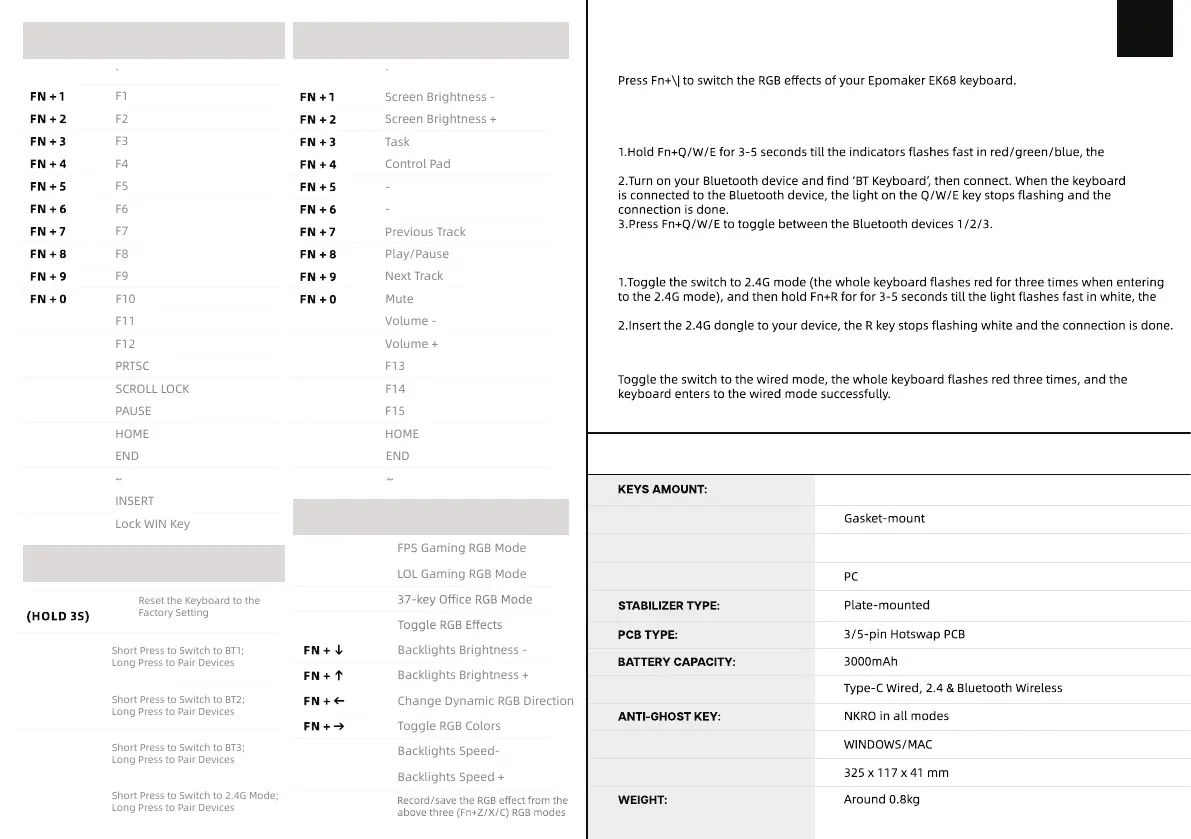
FN + Z
FN + X
FN + C
FN + L-SHIFT
FN + \|
FN + [{
FN + ]}
FN + BACKSPACE
Reset the Keyboard to the
Factory Setting
FN + Q
Short Press to Switch to BT1;
Long Press to Pair Devices
Short Press to Switch to BT2;
Long Press to Pair Devices
FN + W
F U N CTI O N K E Y COMBI N ATION S
L I GHT E FFECT S
Short Press to Switch to BT3;
Long Press to Pair Devices
FN + E
FN + I
FN + I
FN + O
FN + O
Change Dynamic RGB Direction
FN + -
FN + -
FN + P
FN + +
FN + +
FN + PGUP
FN + PGUP
FN + ESC
SHIFT + ESC
SHIFT + ESC
FN + DEL
FN + PGDN
FN + PGDN
FN + WIN
FN + ESC
FN + P
Short Press to Switch to 2.4G Mode;
Long Press to Pair Devices
FN + R
M A C
keyboard is ready to pair.
P A I RING BL U E T O O T H
Toggle the switch to make sure that the keyboard is under the Bluetooth mode:
SHELL MATERIAL:
PLATE MATERIAL
Plastic
66 keys + 1 knob


 To Next Page