EasyManua.ls Logo

Epomaker EK75 - User Manual

Epomaker EK75
7 pages
Print Icon
To Next Page IconTo Next Page
Loading...
QUICK START GUIDE
RKER
EPOMAKER EK75
Inllnllnlln!
EN
2 3 4 5 6 7 8 9 O
Backpace
Enter
Home
End
pgup
innggTgTggggTgrgan—giÄj
Ctrl
Made in China
Win
75% Triple Modes Hot Swappable VIA-programmable Keyboard
Should you require more assistance please email us at support@epomaker.com
•@
EC
6.
Manufacturer: Shenzhen Changyun Technology co., Ltd.
Address: Seventh Floor, Kai Daer Building, No.168 Tongsha Road,
Xili Street, Nanshan Disctrict, Shenzhen,Guangdong, CN
Email: support@epomaker.com
Web: www.epomaker.com
REP
REP
APEX CE SPECIALISTS LIMITED
unit 3d North point House, North point Business park,
New Mallow Road Cork, T23 AT2P, Ireland
contact: wells Tel: +353212066339
APEX CE SPECIALISTS LIMITED
89 Princess Street, Mancheste, MI 4HT, UK
Contact: Wells
E—mail: info@apex—ce.com
Question and Answer IconNeed help?

Do you have a question about the Epomaker EK75 and is the answer not in the manual?

Summary

Basic Keyboard Functions

Media and System Keys

Details basic functions accessible via Fn key combinations like media control and system utilities.

Connectivity and Mode Shortcuts

Explains key combinations for switching connection modes and pairing devices.

System Lock and OS Mode

Covers Win Lock and OS mode switching shortcuts for system compatibility.

Wireless Connection Guide

Bluetooth Pairing Procedure

Step-by-step instructions for connecting the keyboard via Bluetooth.

2.4 GHz Dongle Setup

Instructions for establishing a connection using the 2.4GHz wireless dongle.

Wired Mode and Charging

Details on how to connect via USB and notes on battery charging.

VIA Software Customization

VIA Application and JSON Import

Guide to downloading the VIA application and importing necessary JSON files.

Keycap and Switch Maintenance

Switch and Keycap Handling

Instructions for safely removing and installing keyboard switches and keycaps.

Support and Warranty Information

Technical Support Contact

Information on how to get technical help via email and expected response times.

Community Forum Access

Links to Discord and Reddit for user support and discussion.

Product Warranty Guidelines

Details on EPOMAKER's warranty coverage, exclusions, and purchase conditions.

Overview

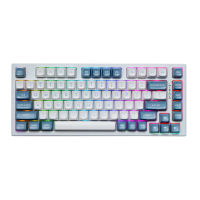
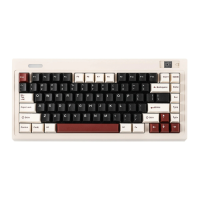
The Epomaker EK75 is a 75% triple-mode, hot-swappable, and VIA-programmable mechanical keyboard designed for versatility and customization. It offers a compact layout while retaining essential function keys and a dedicated F-row, making it suitable for both productivity and gaming.

Function Description:

The EK75 supports three connectivity modes: wired (Type-C), Bluetooth, and 2.4G wireless. This allows users to connect the keyboard to a wide range of devices, including Windows and Mac computers, as well as other Bluetooth-enabled devices. The hot-swappable PCB supports both 3-pin and 5-pin switches, enabling users to easily change switches without soldering, offering extensive customization of typing feel and sound.

The keyboard is VIA-programmable, which means users can remap keys, create macros, and customize lighting effects using the VIA software. This feature provides a high degree of personalization, allowing users to tailor the keyboard's functionality to their specific workflow or gaming preferences.

Important Technical Specifications:

  • Model: EPOMAKER EK75 VIA
  • Keys Amount: 83 Keys (75% layout)
  • Case Material: Aluminum
  • Stabilizer Type: Screw-in
  • PCB Type: 3/5-pin Hotswap PCB
  • Connectivity: Type-C Wired, Bluetooth, 2.4G Bluetooth
  • Anti-Ghost Key: NKRO (N-Key Rollover)
  • Polling Rate:
    • 1000Hz under Wired and 2.4G Mode
    • 125Hz under Bluetooth Mode
  • Battery Capacity: 3000mAh
  • Compatibility: WINDOWS/MAC
  • Dimension: 335 x 159 x 45 mm
  • Weight: Around 2kg

Usage Features:

Basic Functions (FN Key Combinations):

The keyboard features a comprehensive set of FN key combinations for media control and system functions:

  • FN + F1: Player
  • FN + F2: Volume -
  • FN + F3: Volume +
  • FN + F4: Mute
  • FN + F5: Stop
  • FN + F6: Previous Track
  • FN + F7: Pause/Play
  • FN + F8: Next Track
  • FN + F9: Mail
  • FN + F10: Home Page
  • FN + F11: Calculator
  • FN + F12: Search

Lighting Effects (FN Key Combinations):

The EK75 includes customizable lighting effects, particularly for its light bar:

  • FN + BACKSPACE: Turn On/Off ALL Lights
  • FN + ↑: Light Bar Brightness +
  • FN + ↓: Light Bar Brightness -
  • FN + ←: Light Bar Hue -
  • FN + →: Light Bar Hue +
  • FN + [{: Light Bar Sat +
  • FN + ]}: Light Bar Sat -
  • FN + PGUP: Toggle Bar Light Effects
  • FN + PGDN: Change Bar Light Colors

Function Key Combinations:

  • FN + SPACEBAR (HOLD 3S): Reset the Keyboard
  • FN + T: Wired Mode
  • FN + Q: Short Press to Switch to BT1; Long Press to Pair Devices
  • FN + W: Short Press to Switch to BT2; Long Press to Pair Devices
  • FN + E: Short Press to Switch to BT3; Long Press to Pair Devices
  • FN + R: Short Press to Switch to 2.4G Mode; Long Press to Pair Devices
  • FN + WIN: Win Lock
  • FN + A: Win Mode
  • FN + S: Mac Mode

Pairing Bluetooth:

  1. Toggle the switch to the left to ensure the keyboard is in wireless mode.
  2. Hold Fn + Q/W/E for 3-5 seconds until the light bar flashes fast in blue, indicating it's ready to pair.
  3. Turn on your Bluetooth device, find "Epomaker EK75-1/2/3", and connect. The light bar will stop flashing once connected.
  4. Press Fn + Q/W/E to toggle between paired Bluetooth devices 1/2/3.

Pairing Wireless 2.4GHz:

  1. Toggle the switch to the left for wireless mode.
  2. Toggle the switch to 2.4G mode (indicator flashes white).
  3. Insert the 2.4G dongle into your device. The indicator stops flashing white when connected.
  4. To reconnect 2.4G mode, hold Fn + R for 3-5 seconds until the light flashes white.

Wired Mode:

  1. Plug in the keyboard.
  2. Press Fn + T to enter wired mode. Note: The battery charges in both wireless and wired modes as long as it is plugged in.

How to Use VIA:

  1. Download the latest VIA application for your computer's OS from "https://github.com/WestBerryVIA/via-releases/releases".
  2. In the VIA software, turn on the "Use V2 definitions (deprecated)" button.
  3. Import the JSON file:
    • For wired mode: Download the Epomaker EK75 USB JSON file from "https://epomaker.com/blogs/qmk-via/epomaker-ek75-usb-via-json" and load it.
    • For 2.4G mode: Download the Epomaker EK75 2.4G JSON file from "https://epomaker.com/blogs/qmk-via/epomaker-ek75-24g-via-json" and load it.
  4. Once loaded, the "Configure" tab in VIA will display the keyboard layout and programmable functions, allowing for customization.

Maintenance Features:

Replacing Keycaps and Switches:

The EK75 is designed for easy keycap and switch replacement, allowing users to customize their typing experience or repair individual keys. A full guide is available by scanning the QR code or visiting "https://epomaker.com/blogs/guides/diy-guide-how-to-remove-and-replace-your-mechanical-keyboard-switches".

Tools Included:

  • Switch Puller
  • Keycap Puller

Removing Switches:

  1. Align the gripping teeth of the Switch Removal Tool vertically (on the Y-Axis) at the center of the switch.
  2. Apply pressure with the Switch Puller until the switch releases from the plate.
  3. Pull the switch away from the keyboard using a firm but gentle vertical motion.

Installing Switches:

  1. Ensure all switch metallic pins are perfectly straight and clean.
  2. Align the switch vertically with the Gateron logo facing north, ensuring the pins align with the keyboard PCB.
  3. Press the switch down until you hear a click, indicating the switch clips have attached to the keyboard plate.
  4. Inspect the switch to ensure proper attachment and test its functionality. Note: If a key doesn't work, a bent pin is a common cause. Remove the switch and repeat the process. Excessive force can damage pins. Contact customer service if you encounter difficulties to avoid operating errors and potential damage.

Warranty and Support:

Epomaker provides a 1-year warranty for products purchased from their official website (EPOMAKER.com), covering factory defects affecting proper functionality. The warranty does not cover damage from normal wear and tear, or modifications not supported by the original product (e.g., changing internal components, assembling/reassembling, replacing batteries). Warranty claims are only valid for items bought from official stores; for purchases from resellers, contact the reseller directly.

For technical assistance, email support@epomaker.com with your purchase order number and a detailed description of the issue. Responses are typically within 24 hours. Community forums are available on Discord (https://discord.gg/2q3Z7C2) and Reddit (https://www.reddit.com/r/Epomaker/) for peer support and learning.
Epomaker EK75 Specifications

General IconGeneral
BrandEpomaker
ModelEK75
CategoryKeyboard
LanguageEnglish

Related product manuals