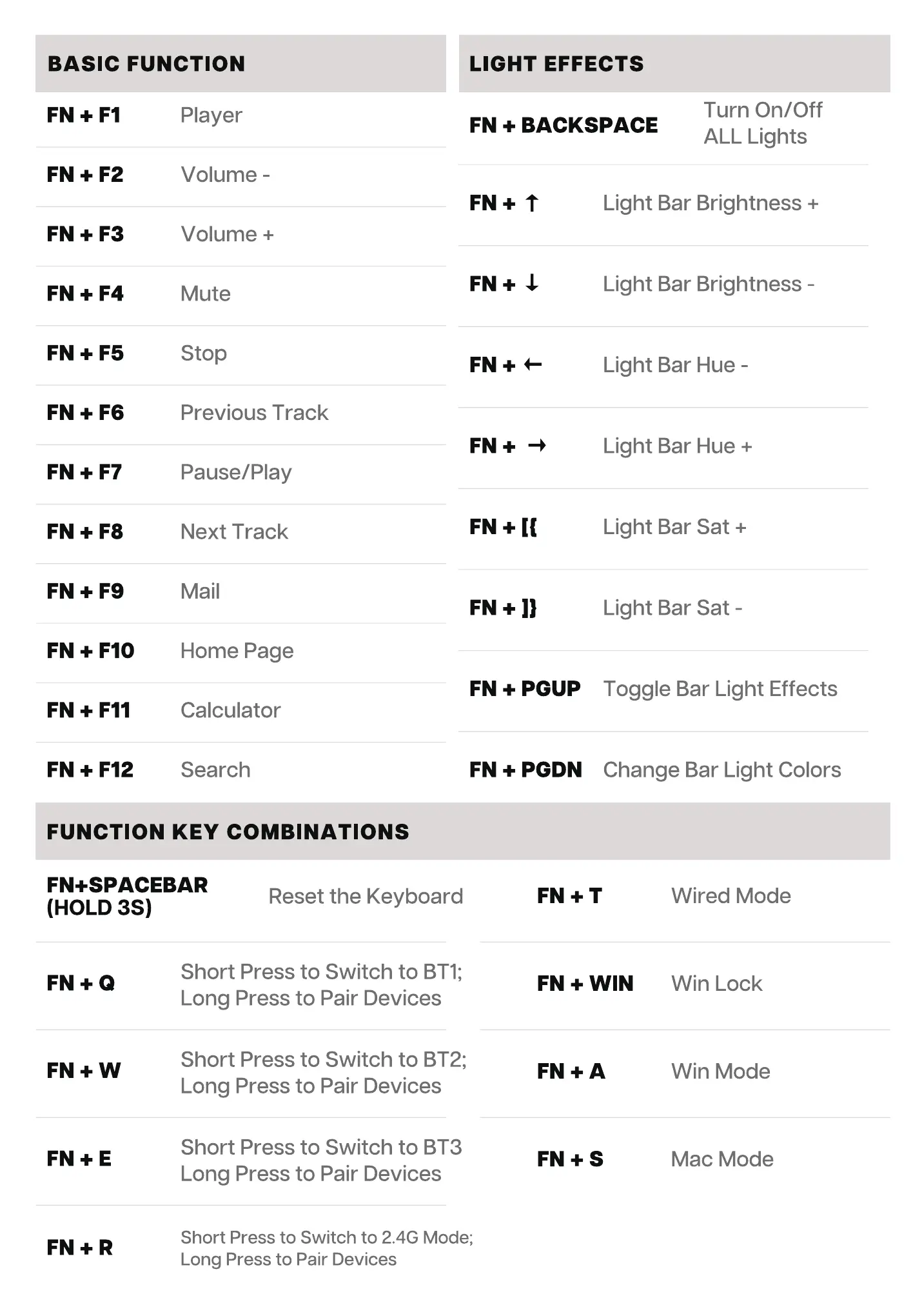
BASIC FUNCTION LIGHT EFFECTS
Turn On/Off
FN + BACKSPACE
FN + Fl
FN + FIO
FN + Fli
FN + F12
Player
Volume -
Volume +
Mute
Stop
Previous Track
Pause/Play
Next Track
Mail
Home Page
Calculator
Search
FN + PGUP
FN + PGDN
ALL Lights
Light Bar Brightness +
Light Bar Brightness -
Light Bar Hue -
Light Bar Hue +
Light Bar Sat +
Light Bar Sat -
Toggle Bar Light Effects
Change Bar Light Colors
FUNCTION KEY COMBINATIONS
FN+SPACEBAR
Reset the Keyboard
(HOLD 3S)
Short Press to Switch to BTI;
Long Press to Pair Devices
Short Press to Switch to BT2;
Long Press to Pair Devices
Short Press to Switch to BT3
Long Press to Pair Devices
Short Press to Switch to 2.4G Mode;
Long Press to Pair Devices
FN + WIN
Wired Mode
Win Lock
Win Mode
Mac Mode


 To Next Page