EN
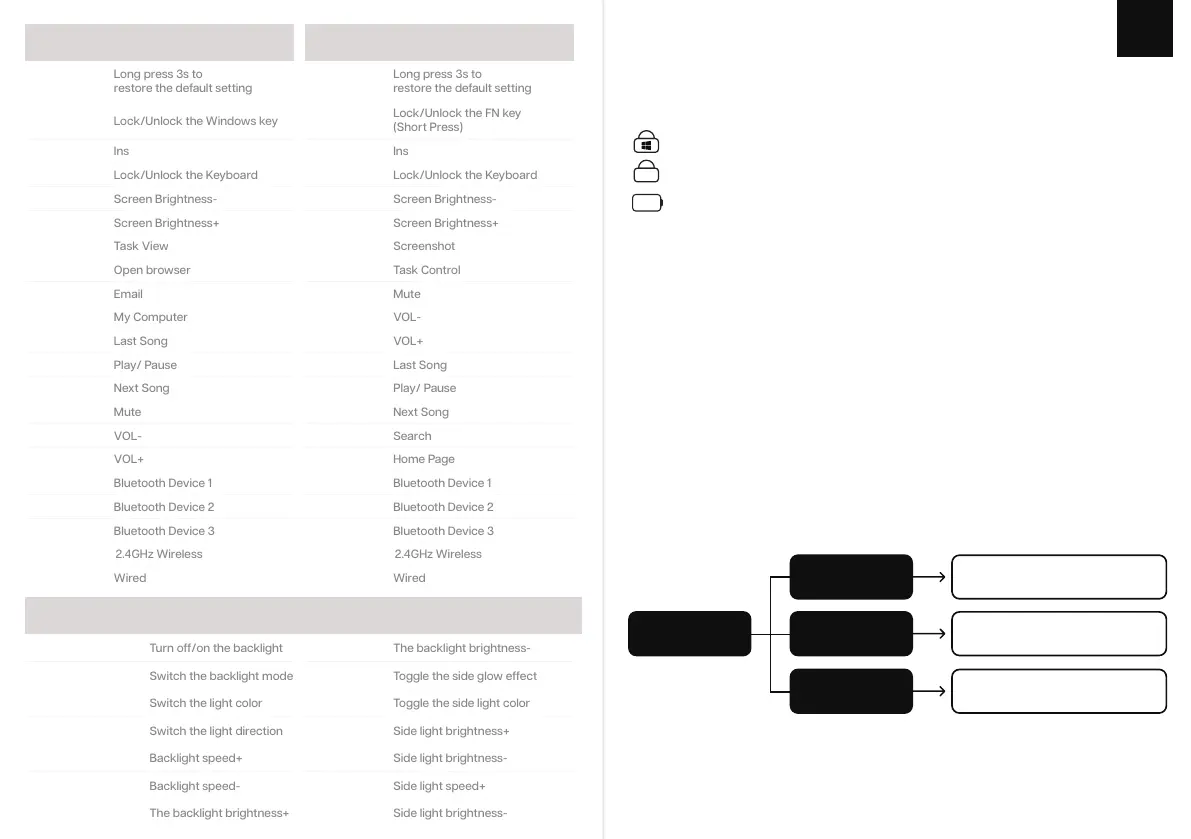
W I N D O W S SHOR T CUT S
B A CKL IGH T SETTI NGS
FN + F5
FN + F5
FN + F4
FN + F4
FN + F6
FN + F6
FN + F7
FN + F7
FN + F9
FN + F9
FN + F8
FN + F8
FN + F11
FN + F11
FN + F12
FN + F12
FN + 1
FN + 1
FN + 2
FN + 2
FN + WIN
Lock/Unlock the Windows key
Lock/Unlock the FN key
(Short Press)
FN + DEL
FN + DEL
FN + P
FN + P
FN + F1
FN + F1
FN + F2
FN + F2
FN + F10
FN + F10
FN + F3
FN + F3
FN + ESC
Long press 3s to
restore the default setting
FN + ESC
FN + ESC
Long press 3s to
restore the default setting
FN + 3
FN + 3
FN + 4
FN + 4
FN + 5
FN + BACKSPACE
Turn off/on the backlight
FN + END
Switch the backlight mode
FN + ←
FN + HOME
FN + →
FN + PGUP
Switch the light direction
FN +↑
The backlight brightness+
FN + 5
FN +↓
The backlight brightness-
FN + R-CTRL
Toggle the side glow effect
FN + [
FN + ;
FN + R-ALT
Toggle the side light color
FN + ]
FN + ‘
I N DIC A T O R I N S TRU C T I ONS :
KEYB O ARD S L EEP I N G
When your keyboard is on 2.4GHz mode or Bluetooth mode, if there is no operation for 5 minutes,
the backlight will turn off, and keyboard will enter into deep sleep without operation for 30 minutes.
P O WER Q U E R Y
When the backlight is turned on, press the key combination Fn+Space, the backlight will turn off,
and the number keys 1 to 0 will light up to display the power ratio. Example 1-5 light means 50%.
Battery Tips
Red light flashes
slowly
Yellow light always
on
Green light always
on
Low Battery
(when the battery is lower than 5%)
Charging
Fully Charged
M A COS S H O R T C U T S
P A I R I N G W I REL ESS 2 . 4 G H Z
FN+4 Switch to Wireless Mode
Short press Fn+4 to the 2.4Ghz mode, then insert the receiver into your device.
P A I R I N G B L U E T O O T H
Long press the FN+1/2/3 for 3 seconds, the keyboard will start pairing and the light under the
1/2/3 key will flash quickly.
Short press FN+1/2/3 to switch to the bluetooth mode 1/2/3, the light under the 1/2/3 key will
flash slowly
(If it has never been paired or there’s no connection, the keyboard will enter into sleep mode)
FN+1/2/3 Long Press for 3 seconds to pair bluetooth device
FN+1/2/3 Short Press to switch to last paired device
1: Caps Lock
2: Win / Fn Lock
3: Keyboard Lock
4: Battery Indicator
Aa
.


 To Next Page