19
Pre-Shared Key: Enables the use of pre-shared keys that are defined on the AP
and the station.
a) Select the Pre-Shared Key radio button.
b) Click on the Configure button and complete the configuration information in the
Define Certificate dialog.
None: No security.
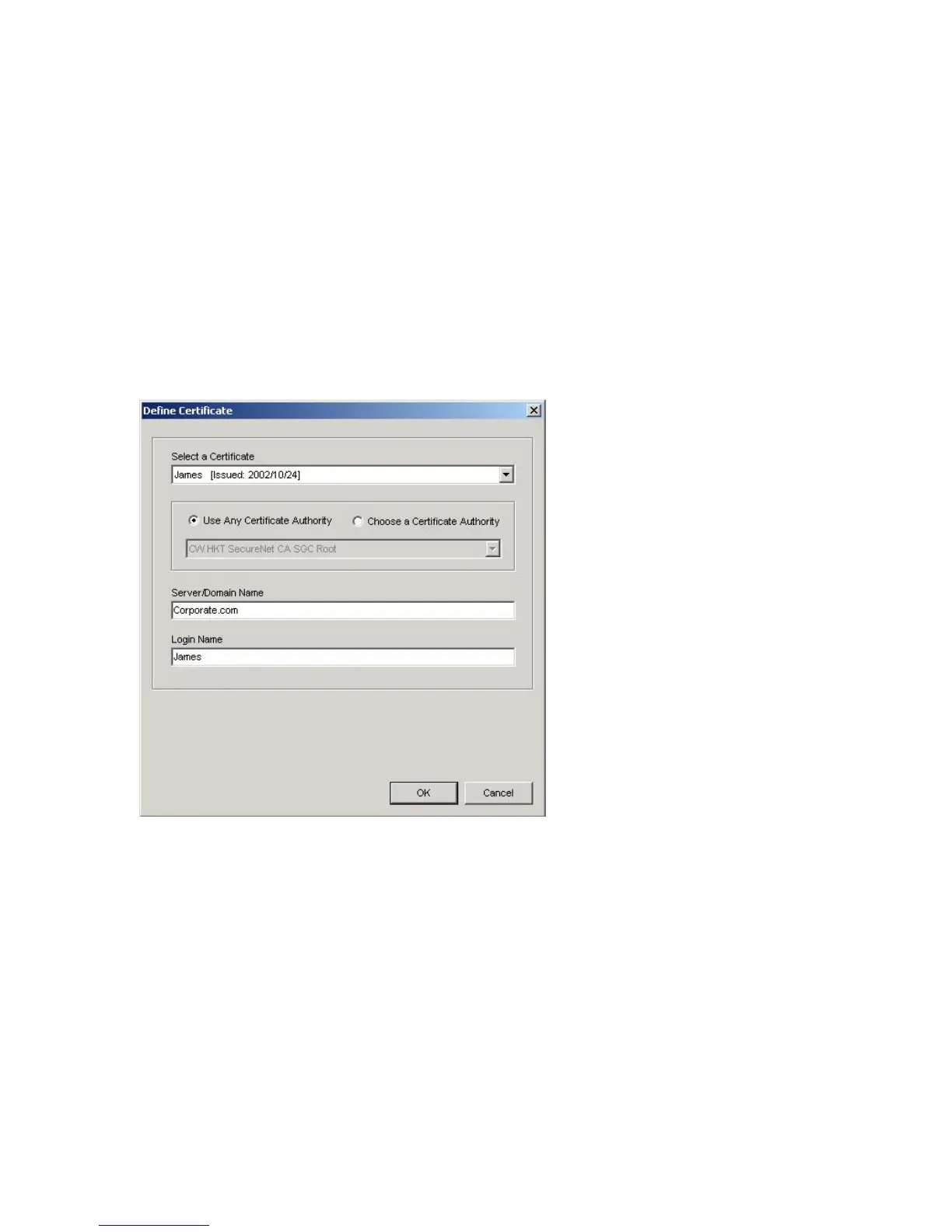
5. Define the Certificate.
Select a Certificate: Select the Certificate to Authenticate to the RADIUS server
from the drop-down menu.
Use any Certificate Authority: The Default Setting. Select this radio button to use
any Certificate Authority (CA) for authentication.
Choose a Certificate Authority: Select this radio button to choose the
desired Certificate Authority for authentication from the drop-down menu.
Server/Domain Name: The the RADIUS server name or the domain name used for
the network access.
Login Name: The username used to log into the server or domain.
Define User Information (PEAP): Click on the Define User Information button
and complete the configuration information in the Define User Information dialog.
6. If selecting WPA-PSK, click on the Configure button to enter the PassPhrase. The
PassPhrase must be a minimum of 8 printable ASCII characters. The PassPhrase



 To Next Page