Getting Started 9
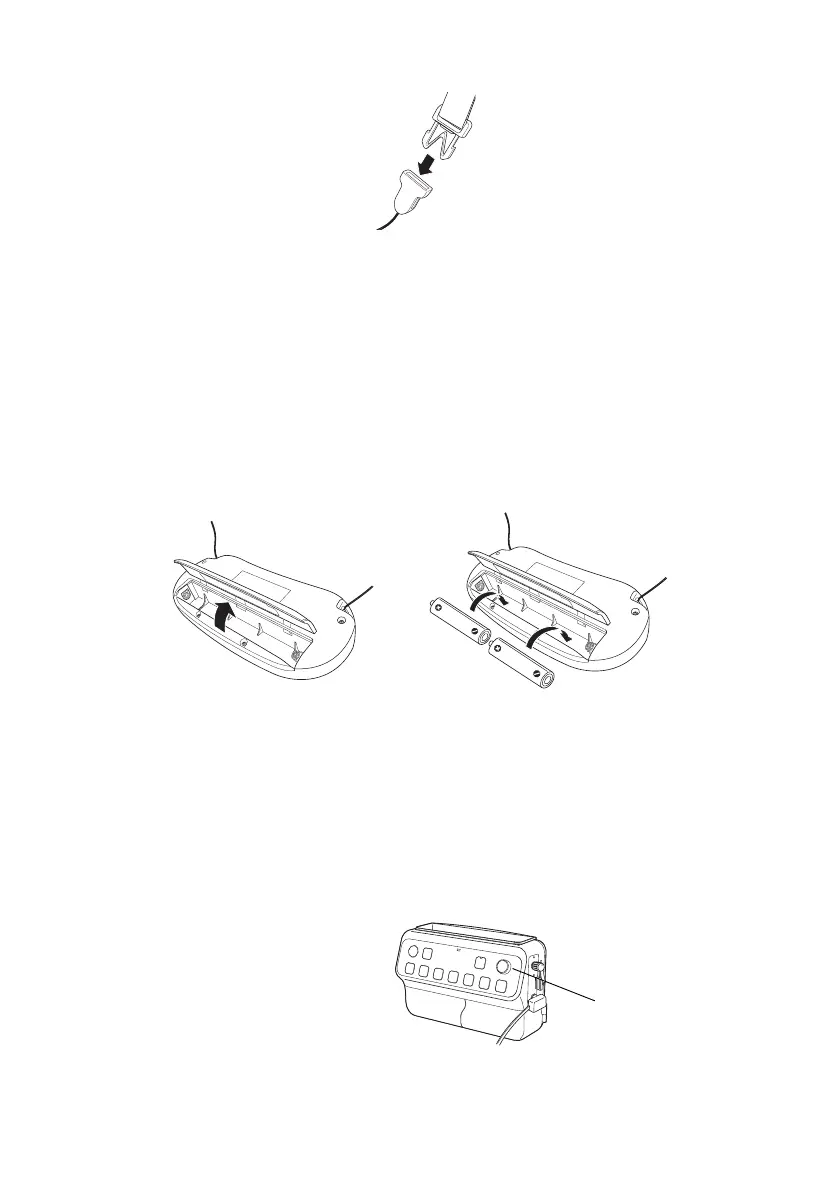
3. Reconnect the ends of the neck strap.
Insert Batteries
If the power button on the pendant microphone turns red or doesn’t illuminate, you may
need to insert or replace the batteries. Follow the steps below to insert batteries in the
pendant microphone.
1. Open the pendant microphone’s battery cover.
2. Check the battery label and insert two AA alkaline batteries into the pendant
microphone.
3. Close the pendant microphone’s battery cover.
Adjust the Sound
Follow the steps in this section to adjust the audio levels.
1. Make sure the Connection & Control Box is on and the green light is lit.
2. Adjust the volume control knob on
the Connection & Control Box to
the far left setting to turn the
volume all the way down.
3. Place the microphone around your
neck with the black emitter facing
away from you.
Volume control knob


 To Next Page