17
R41A0J400
Setup Guide Rev. C2
4119045_00.indd A4 size
7/26 page 17
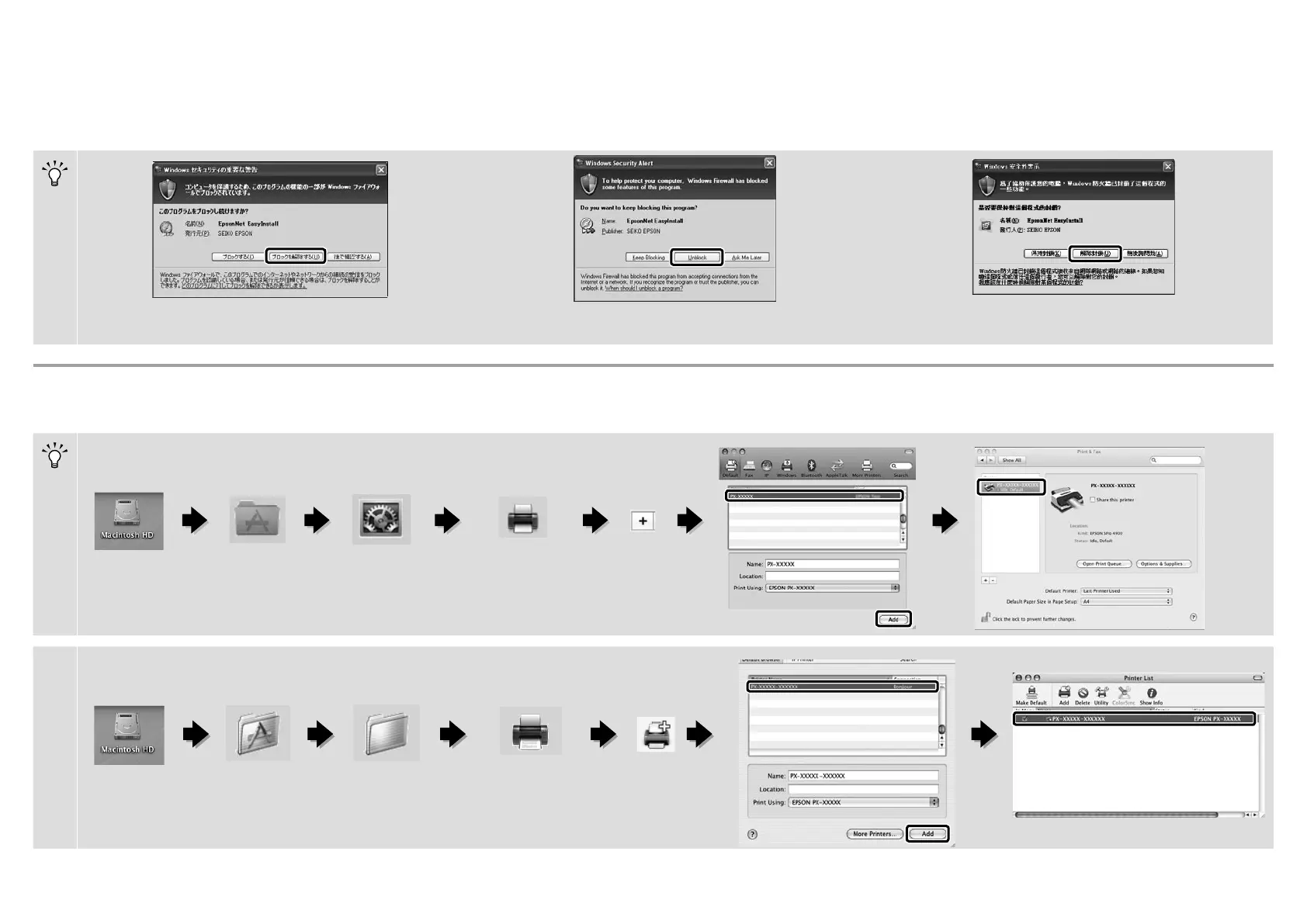
Mac OS X
プリンターの追加
/Adding the Printer/ 新增印表機
Mac OS X v10.4
ア プリケ ー ション /
Applications /
應用程式
ユーティリティ/
Utilities /
工具程式
プリンタ設定ユーティリティ/
Printer Setup Utility /
印表機設定工具程式
追加/
Add /
新增
Mac OS X v10.6, v10.5
ア プリケ ー ション /
Applications /
應用程式
システム環境設定/
System Preferences /
系統偏好設定
プ リント と フ ァク ス /
Print & Fax /
列印與傳真
Windows
上の画面が表示されたら、発行元が「SEIKOEPSON」であること
を確 認して、[ブ ロックを 解除 する]をクリックしてください。
If this dialog box appears, make sure the publisher is SEIKO
EPSON, and then click Unblock.
若出現如上圖所示的對話框時,請確認發行者為〝SEIKO❏
EPSON〞,然後按下『解除封鎖』鍵。



 To Next Page