Windows
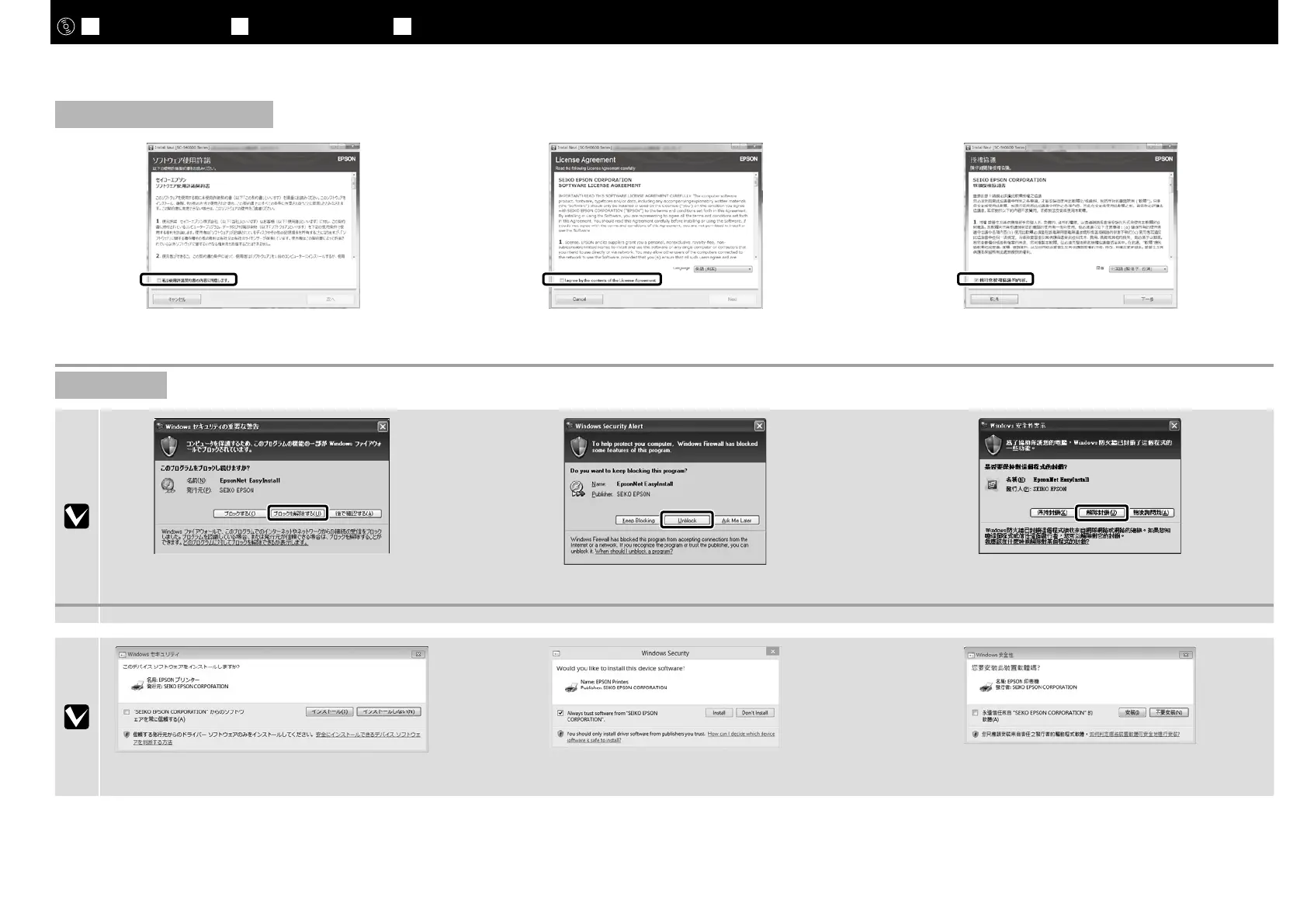
上の画面が表示されたら、発行元が「SEIKO EPSON」で
あることを確認して、[ブロックを解除する]をクリック
してください。
If this dialog box appears, make sure the publisher is SEIKO
EPSON, and then click Unblock.
若出現如上圖所示的對話框時,請確認發行者為“
SEIKO
EPSON
”,然後按下 [ 解除封鎖 ] 鍵。
上の画面が表示されたら、必ず[インストール]をクリッ
クしてください。
Be sure to click Install if the above dialog is displayed.
若出現上述的對話框,請務必按下[安裝]鍵。
[ 3 ]
Windows/Mac OS X
この後は画面の指示に従ってインストールを完了させてください。
Follow the on-screen instructions to complete the installation.
請依照螢幕上的操作說明,完成安裝步驟。
JA
接続とインストール
EN Installing the Software TC
安裝軟體
32



 To Next Page
 Loading...