10
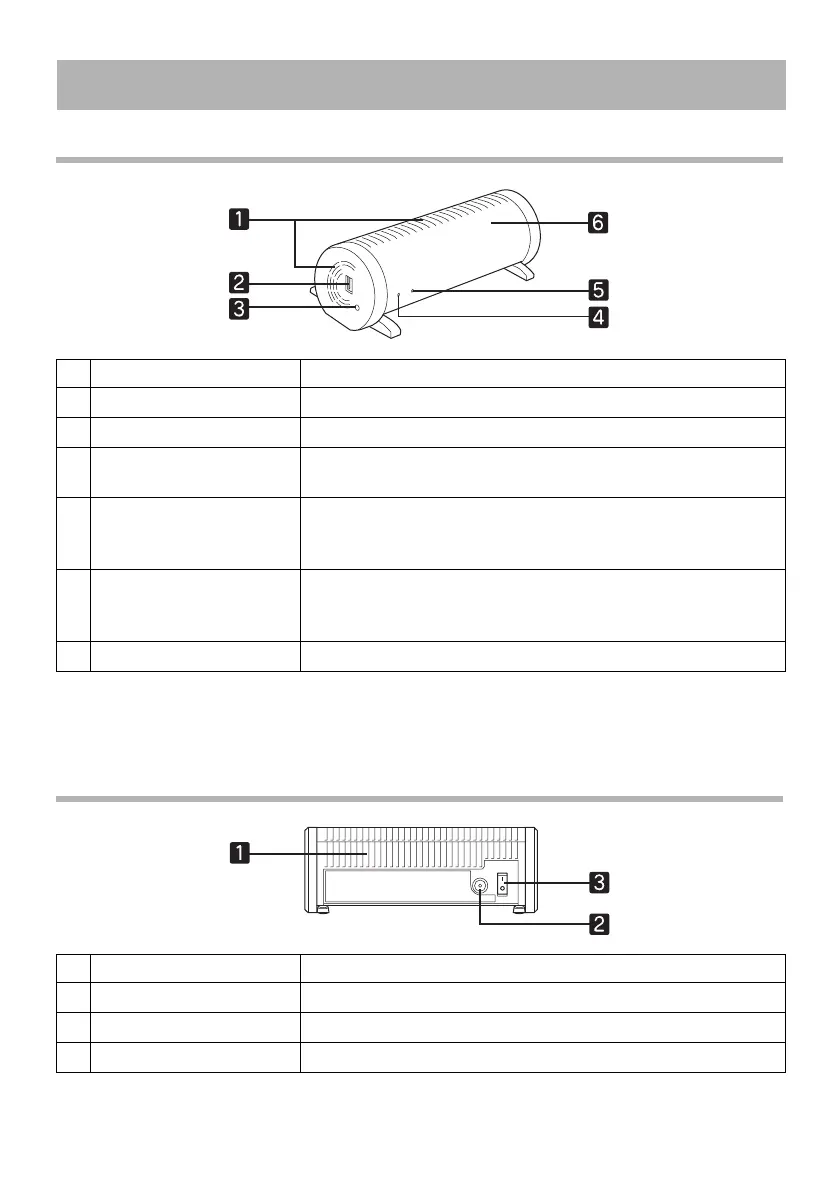
Front and Side
v You can initialize the internal settings for the WirelessHD Transmitter by pressing the
[Setup] button for at least five seconds.
Rear
v A dedicated Mac address for the WirelessHD Transmitter (product number) can be found
on the label on the base of the transmitter.
Part Names and Functions
Name Function
a
Vents Vents for releasing internal heat.
b
HDMI port Connects HDMI compatible AV devices.
c
[Setup] button Reconnects the WirelessHD Transmitter and performs
initialization.
d
Power indicator Lit when the transmitter is on.
See “Indicator Status” (p.11) for more information on other
statuses.
e
Link indicator Lit when communication with the projector is possible.
See “Indicator Status” (p.11) for more information on other
statuses.
f
Antenna location Contains a WirelessHD communication antenna.
Name Function
a
Vents Vents for releasing internal heat.
b
AC adapter connector Connects the AC adapter.
c
Power switch Turns the WirelessHD Transmitter on or off.



 To Next Page