91
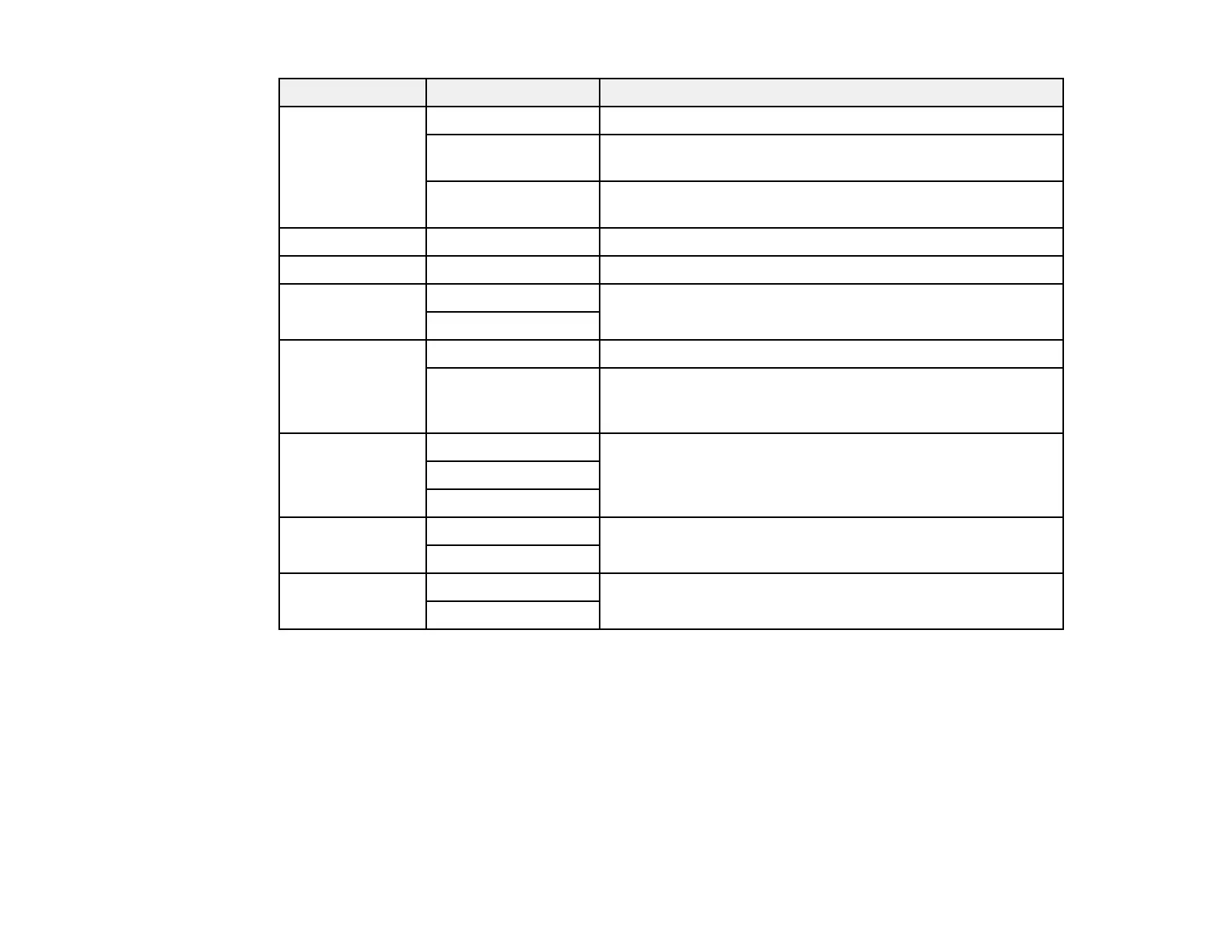
Copying option Available settings Description
Reduce/Enlarge Actual Size Copies the original at its full size or 100% magnification
Auto Fit Page Automatically sizes the image to fit the paper size you
selected
45%->195% and
other conversions
Automatically converts from one size to another
Paper Size Various sizes Select the paper size you loaded
Paper Type Various paper types Select the paper type you loaded
Paper Cassettes Cassette 1 View your paper source settings
Cassette 2
Multi-Page Single Page Copies each page of the original onto an individual sheet
2-up Copies two document pages onto one sheet. Scroll down
and select the document orientation and layout order
settings as necessary.
Quality Draft Adjusts the quality of your copies
Standard
Best
Remove
Background
On Lightens the background of the original
Off
Clear All
Settings
Yes Restore all copy settings to their defaults
No
Parent topic: Copying










 To Next Page