40
30
20
10
0
-10
40
30
20
10
0
-10
8
EN
INSTALLATION
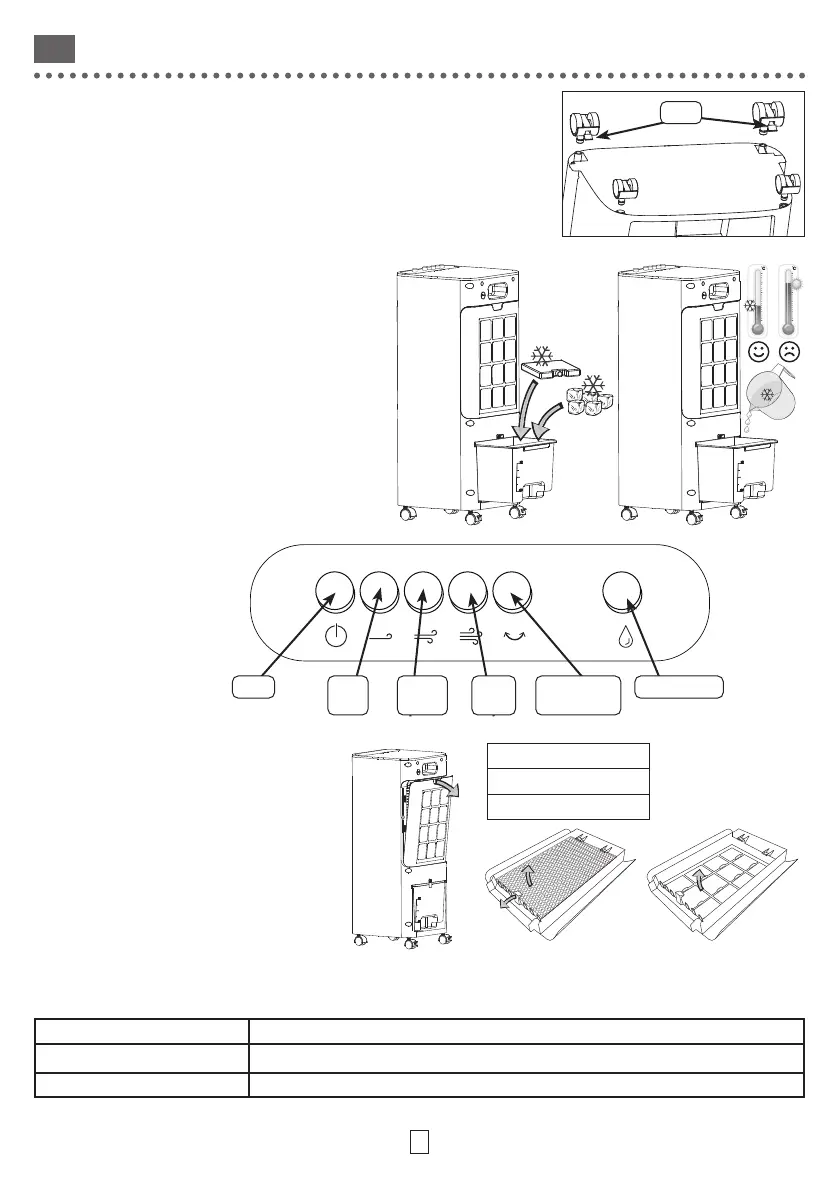
Foot-Wheel Installation
• Insert the foot-wheels by placing the models with brakes at the front of
the device
Filling
• Rotate the lock to take out the tank
• Place a ice-block or ice cubes in the tank
• Fill with very cold water without exceeding the
MAX mark.
• Replace the tank
• Close the lock
Connection
• Connect the plug to a 220-240V 50-60Hz wall
socket
• Unplug the appliance when it is not in operation
USE
Low
speed
Medium
speed
Strong
speed
Freins
Activate refreshActivate
Oscillation
On/O
CLEANING
• Use a soft, dry cloth.
• For persistent stains, use a cloth dampened
with soapy water and wipe immediately with
a dry cloth.
• Regularly clean the dust filter and the
honeycomb filter.
• Replace the honeycomb filter if necessary.
TROUBLESHOOTING
Malfunctions are often due to minor causes; please read the table below before contacting the after-sales service. This
can save you time and avoid unnecessary expenses.
Problem Causes, solutions
The device does not turn on.
Check the power supply.
The device makes an abnormal sound. Check that no foreign body has been accidentally inserted.
Honeycomb Filter
84587042
3276007458541



 To Next Page