97
Operation modes
Several operation modes are available :
• Standby mode : The device is o, it only heats up if the Frost protection mode is activated.
• Manual mode: The device continuously monitors the setpoint temperature (desired temperature) using
one of the 3 powers chosen.
• Program mode: The device follows the recorded programs for the week or the weekend. These programs
define at what times of the day the heater must follow the setpoint temperature or be switched o.
It is essential to have set the time and the day to use the program mode.
Standby / Switching on the device
1 - Press to put the device in standby.
2 - Press again to turn on the device.
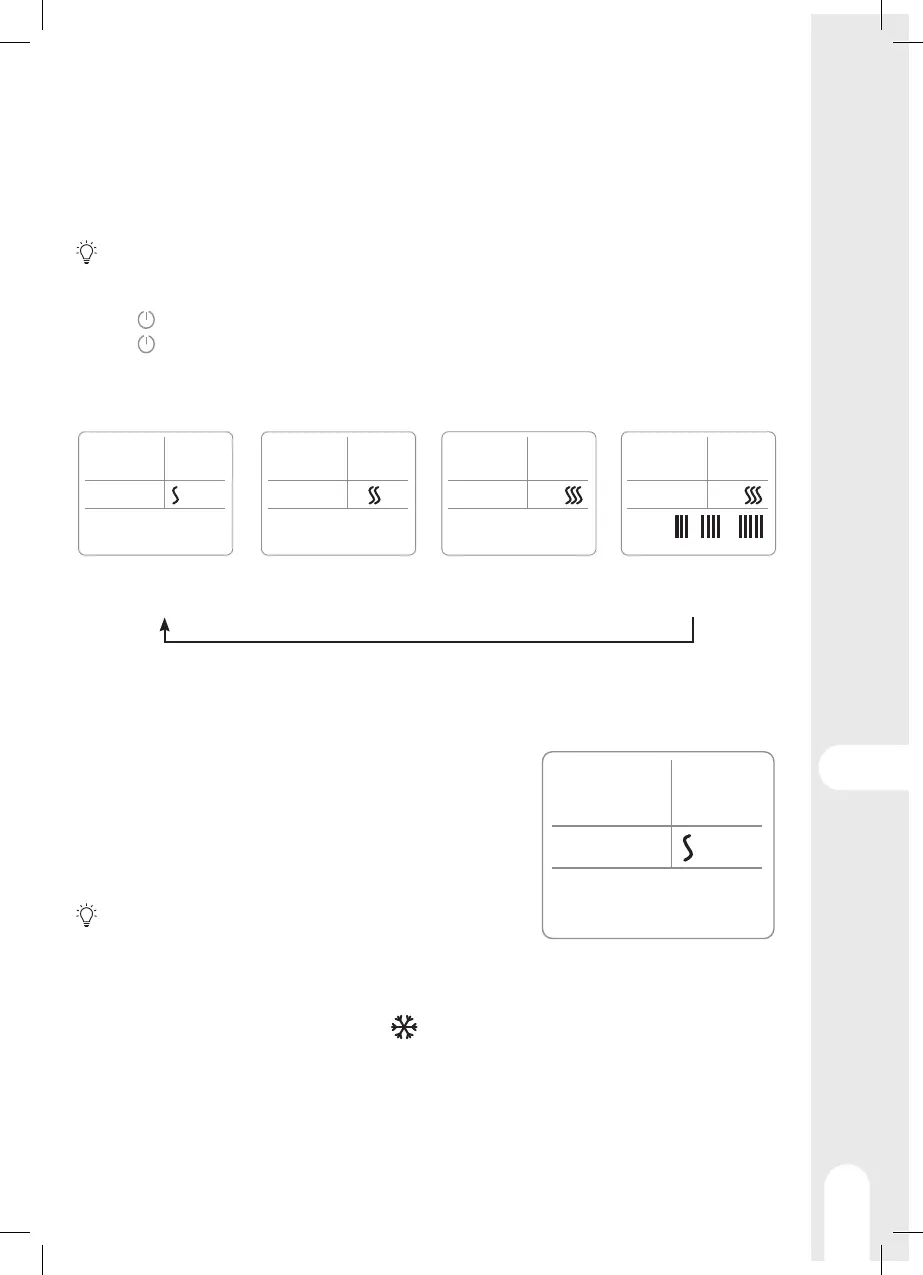
Selection of the operation mode
• Press the MODE key several times to choose the desired mode:
16:46
20
0 3 6 9 12 15 18 21 24
2
°C
M
16:46
20
0 3 6 9 12 15 18 21 24
2
°C
M
0 3 6 9 12 15 18 21 24
16:46
20
0 3 6 9 12 15 18 21 24
2
°C
M
0 3 6 9 12 15 18 21 24 0 3 6 9 12 15 18 21 24
16:46
20
0 3 6 9 12 15 18 21 24
2
°C
P
0 3 6 9 12 15 18 21 24 0 3 6 9 12 15 18 21 24
16:46
20
0 3 6 9 12 15 18 21 24
2
°C
M
16:46
20
0 3 6 9 12 15 18 21 24
2
°C
M
0 3 6 9 12 15 18 21 24
16:46
20
0 3 6 9 12 15 18 21 24
2
°C
M
0 3 6 9 12 15 18 21 24 0 3 6 9 12 15 18 21 24
16:46
20
0 3 6 9 12 15 18 21 24
2
°C
P
0 3 6 9 12 15 18 21 24 0 3 6 9 12 15 18 21 24
16:46
20
0 3 6 9 12 15 18 21 24
2
°C
M
16:46
20
0 3 6 9 12 15 18 21 24
2
°C
M
0 3 6 9 12 15 18 21 24
16:46
20
0 3 6 9 12 15 18 21 24
2
°C
M
0 3 6 9 12 15 18 21 24 0 3 6 9 12 15 18 21 24
16:46
20
0 3 6 9 12 15 18 21 24
2
°C
P
0 3 6 9 12 15 18 21 24 0 3 6 9 12 15 18 21 24
16:46
20
0 3 6 9 12 15 18 21 24
2
°C
M
16:46
20
0 3 6 9 12 15 18 21 24
2
°C
M
0 3 6 9 12 15 18 21 24
16:46
20
0 3 6 9 12 15 18 21 24
2
°C
M
0 3 6 9 12 15 18 21 24 0 3 6 9 12 15 18 21 24
16:46
20
0 3 6 9 12 15 18 21 24
2
°C
P
0 3 6 9 12 15 18 21 24 0 3 6 9 12 15 18 21 24
Manual Mode
Low power
→ Manual Mode
Medium power
→ Manual Mode
High power
→ Program Mode
Manual mode
1 - Press MODE several times to choose the power
2 - Use the
+
and
-
keys to adjust the setpoint temperature (desired temperature).
Continuous mode
16:46
H I
0 3 6 9 12 15 18 21 24
2
M
à In Manual mode, press the SET button to activate Continuous
mode. In this mode, the appliance heats up continuously,
regardless of the setpoint temperature. The HI indication
replaces the temperature display.
à Use the
+
and
-
keys to exit continuous mode and set a new
setpoint temperature.
After 12 hours of continuous mode, the device automatically returns
to standby
Anti Frost protection
• When the appliance is on standby mode, if the ambient temperature drops below 5°C, the anti frost
protection is activated automatically, and the indicator is displayed. As soon as the temperature
grows above 7°C, the protection is deactivated and the device returns to standby.
Program Mode
• Program mode allows to define at what times of the day the heater must follow the setpoint temperature
or be on standby. It is possible to define a program for the week (days 1 to 5) and another for the weekend
(days 6 and 7).






 To Next Page